Using LLMs via Service Providers
Intelligent Agents — Module 2
A.Y. 2026/2027
Giovanni Ciatto
Compiled on: 2026-10-22 — printable version
Outline
Key engineering aspects of LLM-as-a-Service
-
On-premise vs. On-cloud deployment
- On-premise: the model is hosted and run on the user’s own infrastructure, commonly via containerized solutions (e.g. Ollama, Docker’s Model Runner, etc.)
- implies ad-hoc hardware requirements (e.g. Nvidia GPUs, Apple Silicon) and technical expertise for setup and maintenance
- the service provider is commonly the company providing the containerized solution, and making models available for download and use
- most commonly, containerized solutions provide the same API as the on-cloud service, to facilitate migration between the two deployment options
- On-cloud: the model is hosted and run on the service provider’s infrastructure, and accessed via API calls
- implies no hardware requirements for the user, but a cost per usage (e.g. per token, per request, etc.)
- incl. open-weights models hosted by third parties (e.g. OR, Hugging Face Inference): cf. the three options in the governance lecture
- On-premise: the model is hosted and run on the user’s own infrastructure, commonly via containerized solutions (e.g. Ollama, Docker’s Model Runner, etc.)
-
Service Provider: several exist, with different offerings in terms of models, pricing, and features
- e.g. OpenAI, Anthropic, Google, Microsoft, Hugging Face, or aggregators like OpenRouter
- the choice of the service provider can depend on several factors, including:
- the availability of specific models (e.g. GPT, Claude, Gemini, etc.) in their model zoos
- the pricing model and cost structure
- the features and capabilities offered (e.g. fine-tuning, custom models, MCP support, etc.)
-
Web API Compatibility: early providers (e.g. OpenAI, Google) invented their own APIs, similar in the spirit, but different in syntax
- some later providers attempted to adopt the same API as the market leader (OpenAI), to facilitate adoption
- others (e.g. HuggingFace) come with their own API, which may be more or less compatible with OpenAI’s API
- API compatibility is key for provider interchangeability, hence allowing migration and avoiding vendor lock-in
- some later providers attempted to adopt the same API as the market leader (OpenAI), to facilitate adoption
-
Client Libraries, in target programming languages wrap Web API clients and make it easier to use LLMs programmaticatically
- here you may care about which programming languages (e.g. Python, JS, Java, etc.) are supported by some given client library…
- most commonly, the same provider implements the same meta-model onto different target programming languages (e.g. OpenAI’ client is available in Python, JS, Java, etc.)
- there exist also third-party client libraries, which may support multiple Web APIs, and therefore multiple providers (e.g. LangChain)
- here you may care about which programming languages (e.g. Python, JS, Java, etc.) are supported by some given client library…
Model Zoos
Model zoos (pt. 1): the general concept
-
A model zoo (a.k.a. model hub, catalog, library) is a searchable collection of models made available by some provider, each one with:
- a name (and versions/variants), to be used in API calls or downloads
- a model card: a document describing the model’s purpose, training data, evaluation results, limitations, and intended uses (cf. Mitchell et al., 2019)
- technical metadata: size, context window, supported modalities (text, image, audio), support for tools / structured output / reasoning
- economic and legal metadata: price per token (for on-cloud zoos), license (for downloadable models)
-
Zoos are the entry point for model selection, which is a recurring activity in GenAI engineering (cf. GenAI lifecycle)
Example
-
Hugging Face Hub is a model zoo with millions of models for any task and any modality,
- each one with a model card, technical metadata, and license information
- e.g. filter on “Gemma” to see the Gemma family of LLMs, then click on one to see the card

Model zoos (pt. 2): the technological landscape
| Hugging Face Hub | Ollama library | Open Router | |
|---|---|---|---|
| Kind | download (+ some hosted inference) | download, run locally | on-cloud, pay per token |
| Size | millions of models (any task, any modality) | hundreds of curated LLMs | hundreds of LLMs from dozens of providers |
| Naming | organization/model-name |
model:variant (e.g. gemma4:e2b) |
provider/model[:tier] (e.g. google/gemma-4-26b-a4b-it:free) |
| Variants | separate repositories (e.g. ...-GGUF, ...-AWQ) |
tags for size and quantization | one entry per model, served by several providers |
| Metadata | full model card, files, license, community | size, context, capabilities, quantization | price, context, latency/throughput stats, supported parameters |
| License | per model (shown as a tag) | per model (in the model page) | provider’s terms of service apply |
Recurring naming conventions (worth decoding)
- family + version:
llama-3.1,qwen3,gemma-4 - size:
8b,70b, or26b-a4b(MoE: total vs. active parameters), ore2b(effective 2B: Gemma’s ~2.3B parameters used in computation, 5.1B including per-layer embeddings) - flavour:
base(pure next-token predictor) vs.instruct/it/chat(tuned to follow instructions: this is what you want for Chat Completion), orcoder,vl/vision,thinking - quantization / format:
Q4_K_M,GGUF,AWQ,fp8 - date / snapshot:
gpt-4o-2024-08-06(pin it for reproducibility!)
Model zoos (pt. 3): what next?
- Zoos tell you which models exist, and what they claim to be capable of
- Need a model supporting tools or structured output?
- Ollama: look for the
tools,thinking,visionbadges (e.g. filter by tools) - Open Router: filter the models page by supported parameters (e.g.
tools,structured_outputs,response_format)
- Ollama: look for the
- Choosing the right model for a given task, and evaluating it on evidence, are decisions with consequences on quality, cost, control, and compliance
- hence, they are discussed in the AI Governance lecture, along with an exercise on comparing models on the running example
On-premise deployment
Reference technology: Ollama
About Ollama (cf. https://ollama.com/)
-
Ollama is a company that provides a containerized solution for hosting and running LLMs on-premise, with a focus on ease of use and accessibility
-
It offers a model zoo with several pre-trained models available for download and use
- plus a native API that is partially compatible with OpenAI’s API, to facilitate migration between on-premise and on-cloud deployments
-
Ollama’s solutions can be used on various hardware & OS configurations, including Nvidia GPUs and Apple Silicon as well as Linux, MacOS, and Windows
-
Ollama’s API supports both a native CLI conversational interface and a Web API for programmatic access, making it versatile for different use cases and user preferences
-
Ollama may also be used an on-cloud service, but here we will focus on the on-premise deployment option alone
- three levels of premiumships (\$0/month, \$20/month, \$100/month) with widening rate limitations
On-premise Example with Ollama pt. 1
-
Ensure you have the required hardware (e.g. Nvidia GPU, Apple Silicon, etc.)
- details and configuration caveats: https://docs.ollama.com/gpu
- how to tell whether a model fits your machine: see Running models locally below
-
Install Ollama on your machine:
brew install ollama # For macOS (Apple Silicon) curl -fsSL https://ollama.com/install.sh | sh # For Linux irm https://ollama.com/install.ps1 | iex # For Windows (PowerShell) -
Activate the Ollama service in some shell (alternatively, configure a deamon to run it in background):
ollama serve
On-premise Example with Ollama pt. 2
-
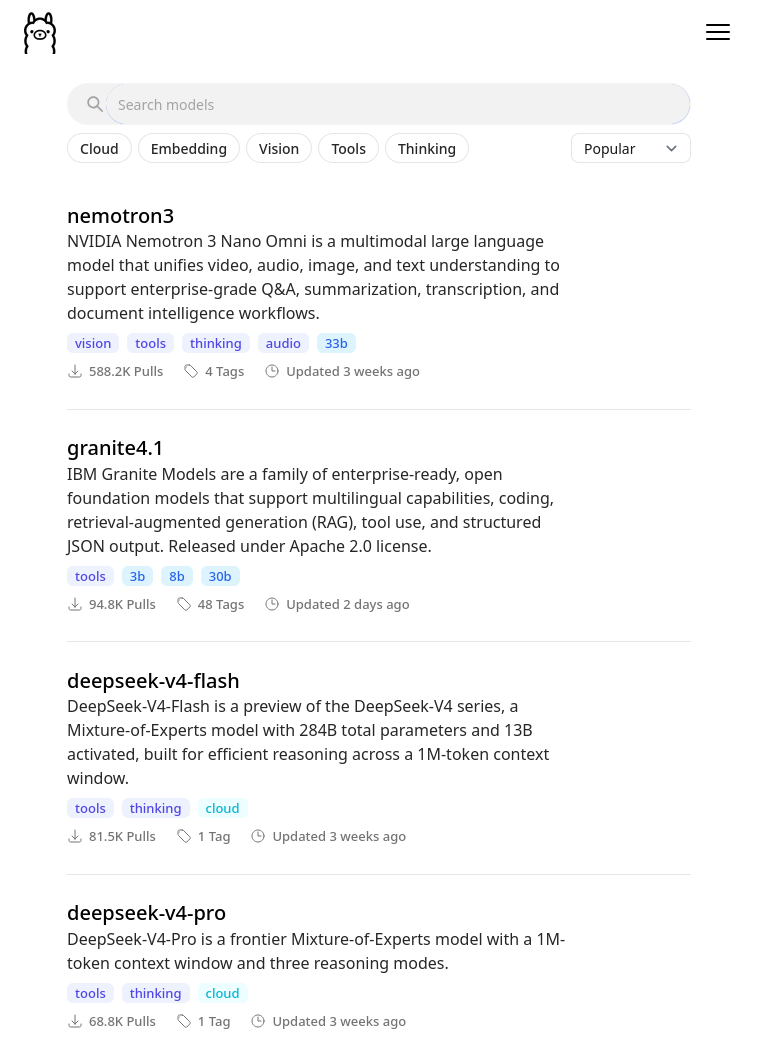
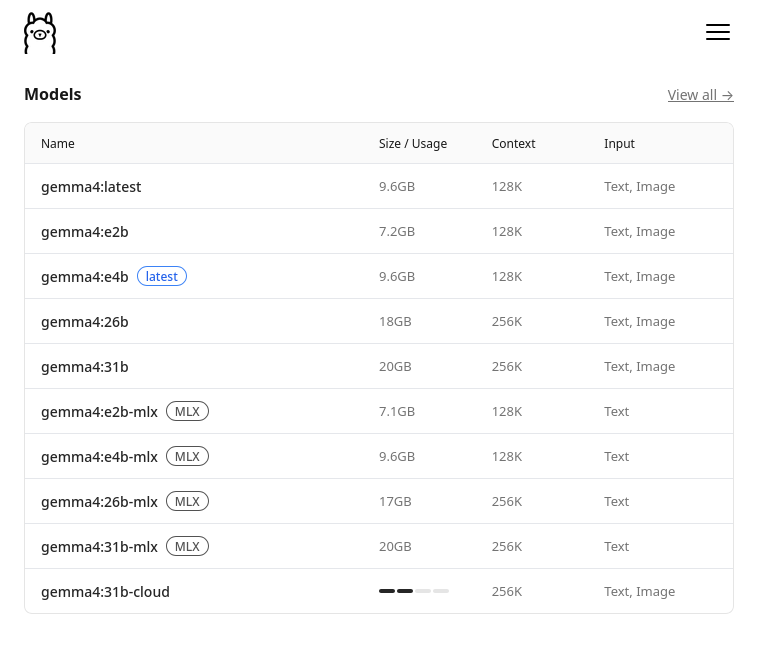
Have a look to Ollama’s model zoo on https://ollama.com/models, and select some model you like among the many variants available
- notice naming convention:
model:variant, most commonly the variant denotes the size of the model
- notice naming convention:
On-premise Example with Ollama pt. 3
-
Pick one model, e.g.
gemma4:e2b, and pull it:ollama pull gemma4:e2b -
You may use Ollama’s native CLI conversational interface to try the model out:
ollama run gemma4:e2bexample of conversation (notice that the model is also showing its thinking process):
>>> ciao!
Thinking...
Thinking Process:

1.  **Analyze the input:** The input is "ciao!". This is an informal Italian greeting, meaning "hello!".
2.  **Determine the appropriate response:** Since the user initiated a friendly greeting, the response
should also be a greeting, ideally reciprocating the language or offering a friendly follow-up.
3.  **Formulate the response (in Italian):** The simplest and most common reply is "ciao" (hello/hi) or
a slightly expanded version.
4.  **Add a standard conversational element (optional but good practice):** Asking how the user is doing
is polite. ("Come stai?" / "Come va?")
5.  **Final selection:** A friendly, standard reply.

*Self-Correction/Refinement:* Keep it warm and open-ended.

*Output Generation:* Ciao! Come stai? (Hello! How are you?)
...done thinking.

Ciao! Come stai? 😊
On-premise Example with Ollama pt. 4
- Should you ever want to use the model programmatically, you can use Ollama’s API, which is partially compatible with OpenAI’s API
-
e.g. it supports the same
/v1/chat/completionsendpoint, but not all the features of OpenAI’s API, e.g. thetool_choice,logit_bias,user, andnrequest fields, nor the files, batches, or fine-tuning endpoints (cf. compatibility page) -
in the client program, recall to set the API base URL to point to your local Ollama service (by default: http://localhost:11434/v1)
-
to prove that the API is working, you can send a test request via
curl:curl -X POST "http://localhost:11434/v1/chat/completions" \ -H "Content-Type: application/json" \ -d '{ "model": "gemma4:e2b", "messages": [ {"role": "system", "content": "You are a helpful assistant."}, {"role": "user", "content": "What is the capital of France?"} ] }'result (converted in YAML for the sake of readability):
id: chatcmpl-85
object: chat.completion
created: 1779435598
model: gemma4:e2b
system_fingerprint: fp_ollama
choices:
  - index: 0
    message:
      role: assistant
      content: The capital of France is **Paris**.
      reasoning: |-
        Thinking Process:

        1.  **Analyze the Request:** The user is asking a factual question: "What is the capital of France?"
        2.  **Identify the Knowledge Needed:** I need to retrieve the capital city of France.
        3.  **Recall/Retrieve the Fact:** The capital of France is Paris.
        4.  **Formulate the Answer:** Provide a direct and accurate answer.
        5.  **Final Review:** The answer is correct and directly addresses the query. (Capital of France = Paris).
    finish_reason: stop
usage:
  prompt_tokens: 29
  completion_tokens: 121
  total_tokens: 150
-
Running models locally: what does it take? (pt. 1)
The general concept: a model is a (huge) array of numbers
- An LLM is essentially a collection of parameters (a.k.a. weights), i.e. numbers learned during training
- model size is expressed in number of parameters: e.g.
7B= 7 billion parameters,70B= 70 billion
- model size is expressed in number of parameters: e.g.
- To run a model (inference), all its weights must be loaded in the memory of the device doing the computation
- ideally, the GPU’s memory (VRAM), as GPUs are much faster than CPUs at the matrix multiplications LLMs are made of
- Hence, the memory footprint of a model is roughly:
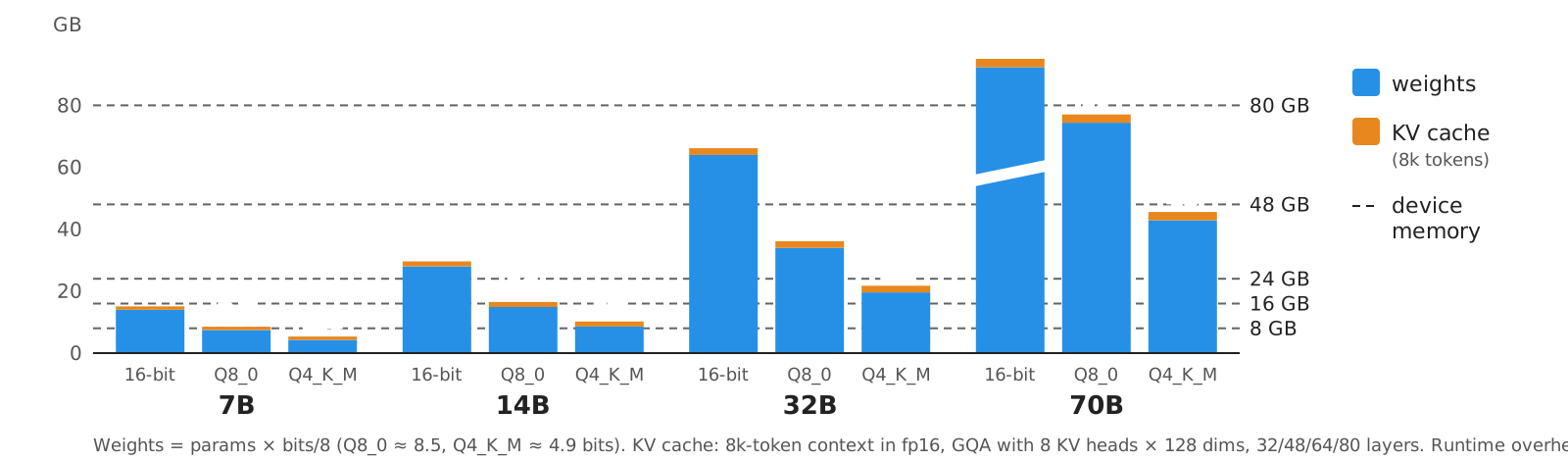
memory ≈ (number of params × bits per param / 8) [weights] + KV cache [grows with context length] + overhead
- the key-value (KV) cache stores the attention keys and values of every token processed so far…
- … so that they do not need to be recomputed for every new token generated
- its size grows linearly with the context length
- this is why local runtimes (e.g. Ollama) use a smaller default context window than the model’s maximum
- the overhead covers runtime buffers, activations, and driver context: usually an extra ~10–20%
Running models locally: what does it take? (pt. 2)
Rule of thumb for the weights alone
| Model size | 32-bit (fp32) |
16-bit (fp16/bf16) |
8-bit (int8, Q8_0) |
~4-bit (Q4_K_M) |
|---|---|---|---|---|
| 1B | 4 GB | 2 GB | ~1 GB | ~0.6 GB |
| 7B | 28 GB | 14 GB | ~7.5 GB | ~4.3 GB |
| 14B | 56 GB | 28 GB | ~15 GB | ~8.6 GB |
| 32B | 128 GB | 64 GB | ~34 GB | ~20 GB |
| 70B | 280 GB | 140 GB | ~74 GB | ~43 GB |
- i.e. GB ≈ billions of params × bits per weight / 8 (
Q8_0≈ 8.5 bits,Q4_K_M≈ 4.9 bits, cf. llama.cpp’s quantize docs) - add ~10–20% runtime overhead, plus the KV cache (it grows with the context: several GB at 32k+ tokens)
- models are trained in 16/32 bits, but most local users run them at 8 or 4 bits: this is called quantization
Before pulling a model, do the math: if it does not fit in VRAM, it will either fail to load, or be (partially) offloaded to the CPU, becoming much slower
Quantization (pt. 1): the concept
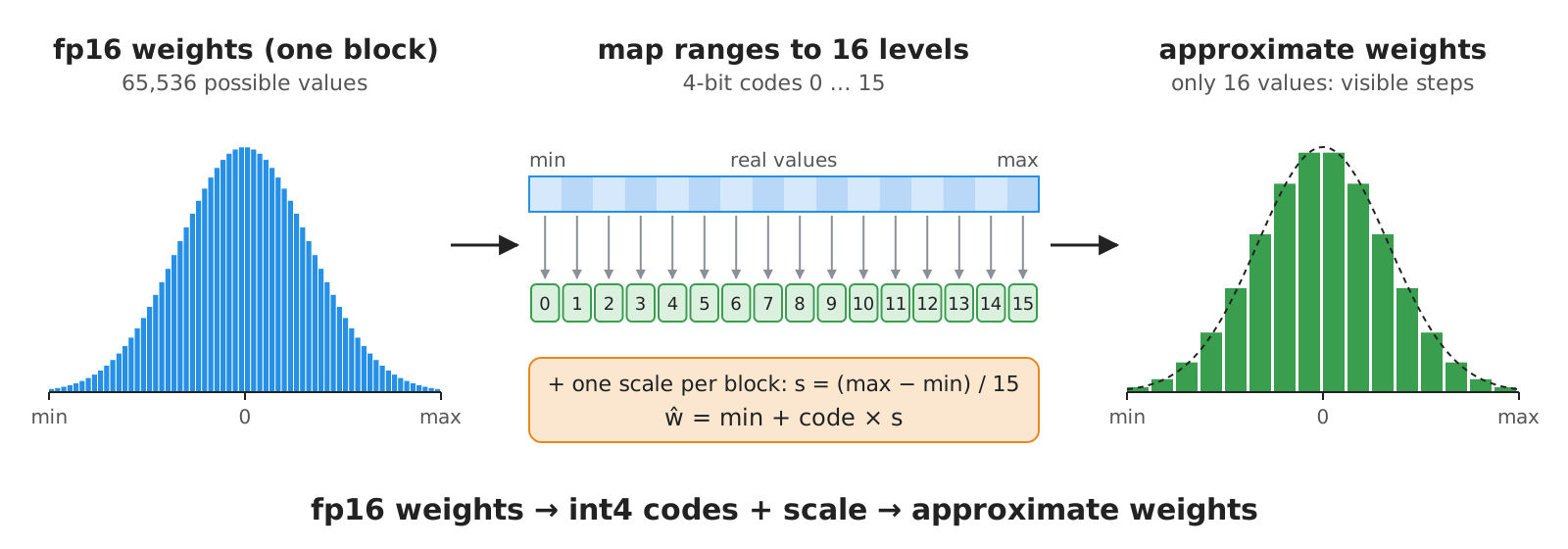
- Quantization = representing the model’s weights with fewer bits (e.g. 4-bit integers instead of 16-bit floats)
- by mapping ranges of real values onto a small set of discrete levels, plus some scaling factors (stored per block of weights)
- Why?
- less memory $\implies$ bigger models on the same hardware
- faster inference, as moving weights around in memory is the main bottleneck
- At what price?
- loss of precision $\implies$ some quality degradation, which is often negligible at 8 bits, noticeable at 4 bits, and severe below 3 bits
- degradation is task-dependent (e.g. worse for maths, code, and non-English languages)
Quantization (pt. 2): the technological landscape
Several quantization methods and file formats exist, bound to specific runtimes:
| Format / method | Typical runtime | Notes |
|---|---|---|
| GGUF | llama.cpp, Ollama, LM Studio | single file with weights + metadata; runs on CPU, GPU, Apple Silicon; many quant levels |
| GPTQ | vLLM, Hugging Face Transformers | post-training quantization calibrated on sample data; GPU-oriented |
| AWQ | vLLM, Hugging Face Transformers | preserves the most “salient” weights; GPU-oriented |
| bitsandbytes (LLM.int8()) | Hugging Face Transformers | quantizes on the fly when loading; used for fine-tuning too |
| MLX | MLX, LM Studio | Apple Silicon only |
Decoding GGUF quantization labels (as seen in Ollama’s tags)
F16/BF16: no quantization (16-bit)Q8_0: 8-bit (~8.5 bits per weight, including block scales), nearly losslessQ4_K_M: ~4.9 bits per weight on averageK= k-quants (super-blocks of weights whose sub-block scales are quantized too)Medium mix (a few sensitive tensors kept at higher precision): the usual default trade-off
Q2_K,Q3_K_S, … : smaller and increasingly lossy (Small,Medium,Large mixes)IQ*: importance-matrix quants, calibrated on sample text to lose less at very low bit-widths
e.g. ollama pull gemma4:e2b downloads the default quantization, whereas tags like ...-q8_0 or ...-fp16 select a specific one (see the “Tags” tab of each model on Ollama’s zoo)
Running models locally: hardware & software (pt. 1)
Hardware
- Nvidia GPUs (CUDA): the reference platform; the VRAM size is what matters most (e.g. 8, 12, 16, 24 GB for consumer cards; 40–80+ GB for data-center ones)
- AMD GPUs (ROCm): supported, with fewer models of cards and more caveats
- Apple Silicon (Metal): CPU and GPU share a unified memory, so the whole RAM (minus what the OS needs) is usable by the model
- CPU only: works for small models, but expect few tokens per second
- Partial offloading: layers that do not fit in VRAM run on the CPU, which works but is much slower
(cf. https://docs.ollama.com/gpu for the supported GPUs)
Mixture-of-Experts (MoE) models
- Some models activate only a subset of their parameters for each token
- e.g.
gemma-4-26b-a4b-it= 26B total parameters, ~4B active per token
- e.g.
- Memory depends on the total parameters (all experts must be loaded), speed depends on the active ones
Running models locally: hardware & software (pt. 2)
What fits where? (indicative, at ~4-bit quantization, moderate context)
| Machine | Comfortable model size |
|---|---|
| laptop, 8 GB RAM, no GPU | ≤ 3B (slow) |
| laptop, 16 GB unified memory (Apple Silicon) | ≤ 8B |
| desktop, 12–16 GB VRAM GPU | ≤ 14B |
| workstation, 24 GB VRAM GPU (or 32–64 GB unified memory) | ≤ 32B |
| server, 2× 80 GB GPUs | ≤ 70B at 16-bit (140 GB, tight), ~120B+ at 8-bit, larger with 4-bit or MoE |
Software
-
up-to-date GPU drivers (CUDA for Nvidia, ROCm for AMD; Metal is built into macOS)
-
a runtime: Ollama (simplest), LM Studio (GUI), llama.cpp (lowest level), vLLM (server-grade, high throughput, many concurrent users)
- all of them expose an OpenAI-compatible Web API, so client code does not change
-
check what is running, and where, with
ollama ps(on an Apple Silicon laptop):NAME ID SIZE PROCESSOR CONTEXT RUNNER UNTIL gemma4:e2b 7fbdbf8f5e45 1.7 GB 100% GPU 4096 4 minutes from nowSIZEis the memory actually allocated (weights in use + KV cache), whereasollama listshows the size on disk (7.2 GB forgemma4:e2b: all weights, incl. per-layer embeddings and vision/audio encoders)PROCESSORtells whether the model is fully on the GPU, or split between CPU and GPU (e.g.48%/52% CPU/GPU)CONTEXTis the context window in use: Ollama’s default depends on the VRAM (4k tokens below 24 GiB, 32k up to 48 GiB, 256k above)
On-cloud deployment with Open Router
(Reference technology: Open Router)
About Open Router (cf. https://openrouter.ai/), pt. 1
-
Open Router (OR) is a company that provides an on-cloud service for using LLMs as services, with a focus on provider interchangeability
-
Its distinguishing feature is that it acts as an aggregator of multiple service providers, allowing users to access a variety of models from different providers via a single API, and helping to avoid vendor lock-in
- one can use OR for free, with very limited rates (20 requests per minute, max 50 per day)
- one may buy credits to widen the limitations for free models (see https://openrouter.ai/docs/api_reference/limits for details), or to use pay-per-use models
- other free options are listed in the Free Access appendix
- one can use OR for free, with very limited rates (20 requests per minute, max 50 per day)
-
Pretty rich model zoo, exposing models from many different providers, most notably: OpenAI, Anthropic, Google, xAI, Mistral, etc.
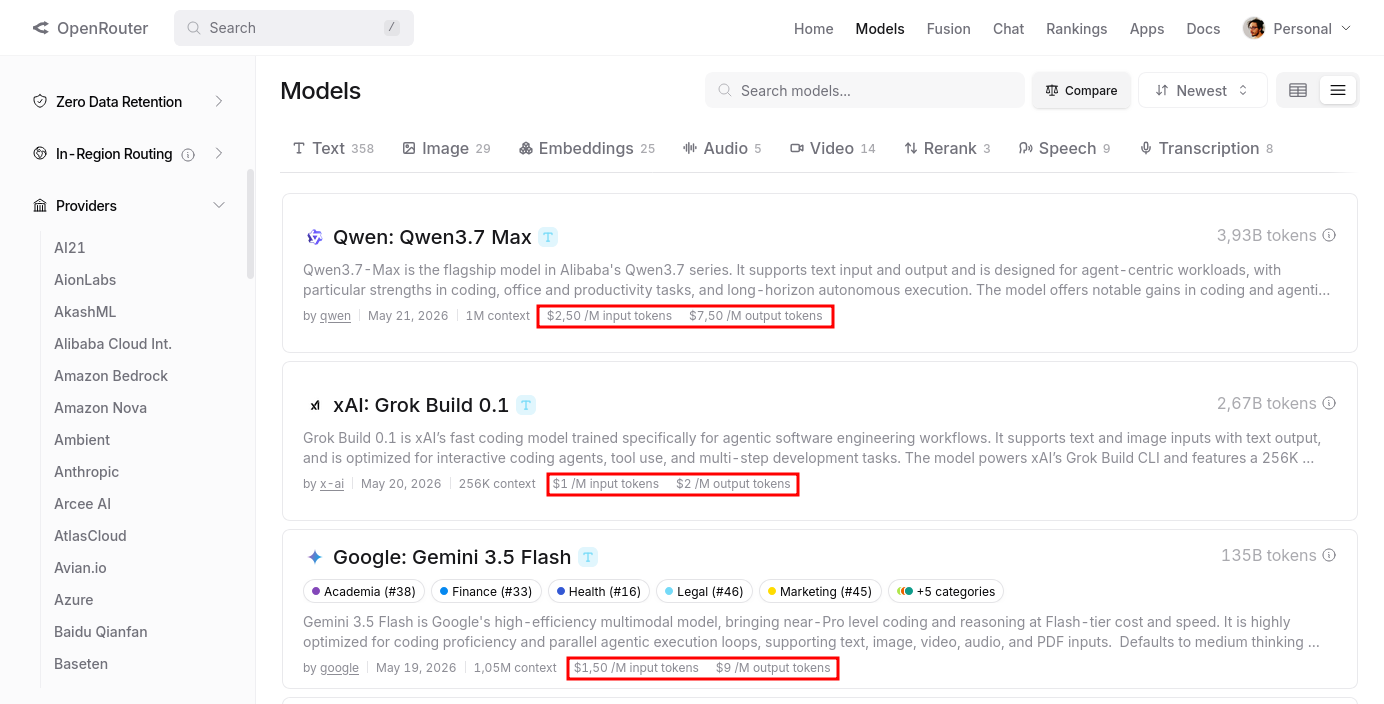
- notice that models come with price-per-token, commonly expressed a
$/1M tokens(some times the prices is different for input or output tokens)- this is very common for on-cloud services, and it is the main reason why we need to be careful when experimenting with them, to avoid unexpected costs
- recall that token $\neq$ word (cf. tokens)
- notice that models come with price-per-token, commonly expressed a
About Open Router (cf. https://openrouter.ai/), pt. 2
-
Models in OR’s zoo are named according to the following convention:
provider/modelfollowed by optional:tier, where:provideris the name of the service provider (e.g.openai,qwen,google, etc.)modelis the name of the model variant as provided by the provider (e.g.gpt-oss-120b,qwen3-coder,gemma-4-26b-a4b-it, etc.)tieris an optional suffix that denotes a specific variant of the model (most commonlyfreefor free models)
-
Dynamic routing of requests happens at two levels:
- among models:
openrouter/auto(Auto Router) lets OR pick the model for each request, based on its content (paid: it may route to paid models, so it fails on accounts without credits)- the candidates can be restricted with glob patterns, e.g.
anthropic/*oropenai/gpt-5*, in the router’sallowed_models(these are not validmodelnames by themselves)
- the candidates can be restricted with glob patterns, e.g.
- among providers of a given model: OR picks one of the providers serving it (provider selection); by default, load-balanced and price-weighted
- override per request with
provider.sort=price|latency|throughput(tokens per second), or in the routing settings of your OR account - or with model suffixes:
:floor(cheapest),:nitro(fastest throughput),:exacto(providers with better tool-calling quality, e.g.moonshotai/kimi-k2-0905:exacto)
- override per request with
- among models:
-
Bring your own API key (BYOK): OR allows you to link your account with your API keys from other providers so that you can use OR’s API to access models from those providers, and therefore be charged according to the prices of those providers instead of OR’s prices
- this is a great feature to avoid vendor lock-in, and to have more control over the costs and the models you want to use
Dynamic routing and BYOK are peculiar features of OR, for the rest it’s an “ordinary” on-cloud provider
On-cloud Example with Open Router (pt. 1)
-
Sign up & log in for an account on Open Router: https://openrouter.ai
- easier to re-use your GitHub account
-
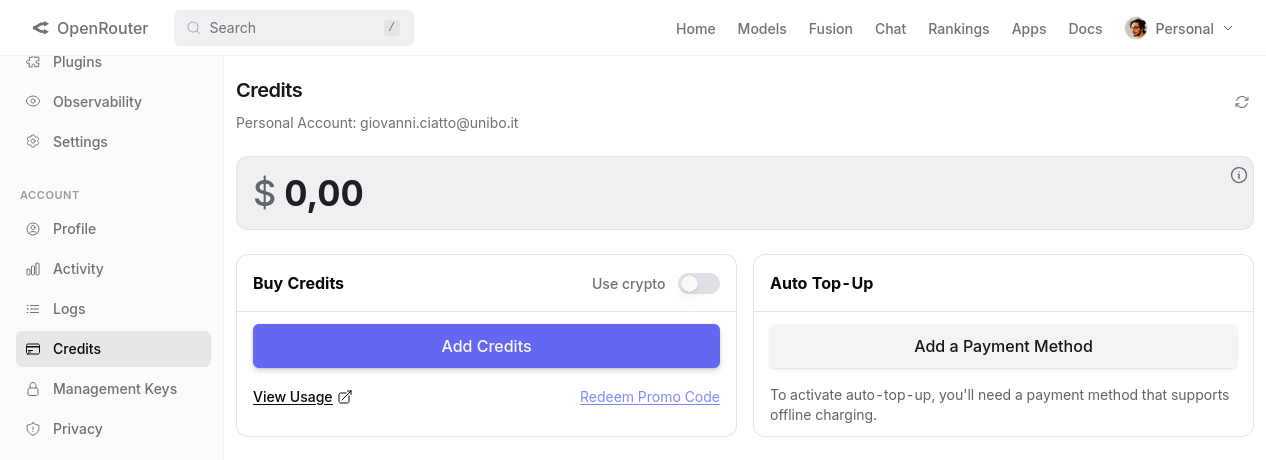
Optionally add payment methods and credits to your account in https://openrouter.ai/settings/credits
- no credit needed for this lecture
- recall to set expense limitation to avoid unexpected costs, in case you decide to experiment with actual money
On-cloud Example with Open Router (pt. 2)
-
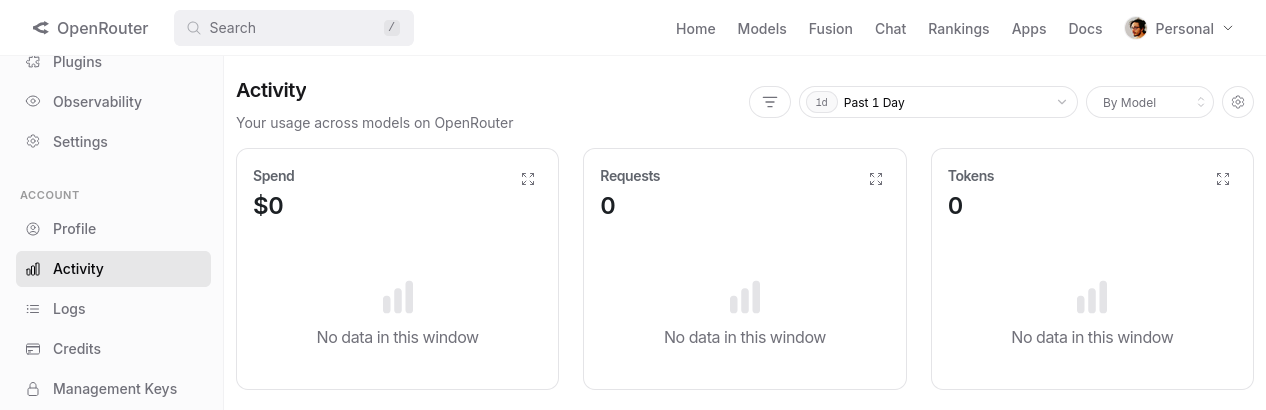
From time to time, keep an eye on the activity dashboard of your account, to check the usage and the costs of your requests: https://openrouter.ai/activity
On-cloud Example with Open Router (pt. 3)
-
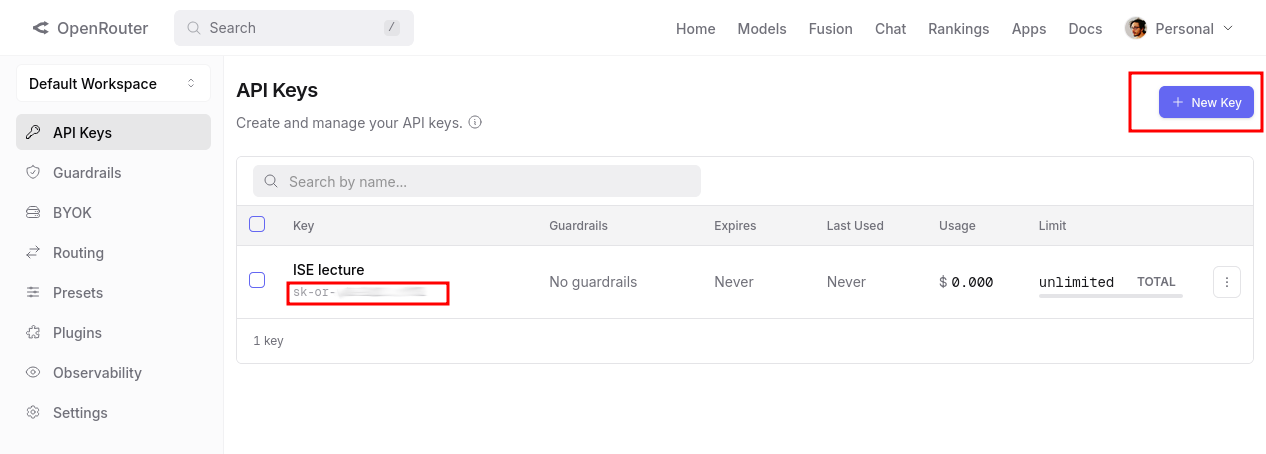
To use OR’s models programmatically, you need to create an API key first (to be stored securely, and not shared with anyone else)
- (i.e. an authentication token to let clients authenticate on your behalf)
- you can do that for the default workspace at https://openrouter.ai/workspaces/default/keys
- workspaces are OR-wise administration domains, inside which configurations rules (e.g. routing rules, cost limits, etc.) apply
- an API key is a string of the form:
sk-or-v1-XXXXXXXXXXXXXXXXXXXXXXXX: it is sufficient to consume your credit and to make requests on your behalf
On-cloud Example with Open Router (pt. 4)
-
You may test your API key with a simple
curlrequest:curl -X POST "https://openrouter.ai/api/v1/chat/completions" \ -H "Content-Type: application/json" \ -H "Authorization: Bearer YOUR_API_KEY" \ -d '{"model": "nvidia/nemotron-3-super-120b-a12b:free", "messages": [{"role": "user", "content": "What is the capital of France?"}]}'
On-cloud Example with Open Router (pt. 4, cont.)
answer (converted in YAML for the sake of readability):
id: gen-1779447979-077vepCYJjlgJfXKnK2q
object: chat.completion
created: 1779447979
model: openai/gpt-5-nano-2025-08-07
provider: OpenAI
system_fingerprint: null
service_tier: default
choices:
  - index: 0
    logprobs: null
    finish_reason: stop
    native_finish_reason: completed
    message:
      role: assistant
      content: Paris.
      refusal: null
      reasoning: '**Providing the capital of France**


        The user asked a straightforward question: "What is the capital of France?"
        The answer is simple: Paris. I should respond concisely. My best guess is
        to confirm: "The capital of France is Paris." While adding context could be
        fun, it’s not necessary since the user didn’t request it. If I wanted to be
        helpful, I could mention that Paris is the largest city and home to famous
        landmarks like the Eiffel Tower, but I’ll keep it brief.**Confirming details
        on Paris**


        I can keep my response short and straightforward. The user asked about the
        capital of France, and I can simply say: "Paris." If I want to offer more,
        I could say, "The capital of France is Paris." I think that covers it! But
        if they are interested, I could mention I''m happy to share more details about
        Paris if they''d like. For now, I’ll stick with the essential answer.'
usage:
  prompt_tokens: 13
  completion_tokens: 243
  total_tokens: 256
  cost: 9.785e-05
  is_byok: false
  prompt_tokens_details:
    cached_tokens: 0
    cache_write_tokens: 0
    audio_tokens: 0
    video_tokens: 0
  cost_details:
    upstream_inference_cost: 9.785e-05
    upstream_inference_prompt_cost: 6.5e-07
    upstream_inference_completions_cost: 9.72e-05
  completion_tokens_details:
    reasoning_tokens: 192
    image_tokens: 0
    audio_tokens: 0
APIs for LLMs
The general concept: Chat Completion as a request–response API
- Regardless of the provider, programmatic access to an LLM follows the same request–response scheme (HTTP + JSON):
- the client (your program) sends a request containing
- the name of the model to be used
- the conversation so far, as an ordered list of messages, each with a role (
system,user,assistant,tool) and some content - optional generation parameters (e.g. temperature, max tokens, output format, available tools)
- the server (the provider) lets the model generate the next message of the conversation
- the server sends a response containing the generated message, plus metadata (e.g. token usage, finish reason)
- the client (your program) sends a request containing
- The model is stateless: it does not remember previous requests
- to have a conversation, the client keeps the history, and re-sends it all at each request (appending the model’s answers to it)
- hence, the cost and latency of each request grow with the conversation length (every request re-processes all tokens)
- A chat is just the special case where the next message is shown to a human, and the human’s reply is appended to the history
Chat Completion: an intuitive example
@startuml hide footbox actor “User” as U participant “Program (client)” as P participant “LLM provider (server)” as L note over P: history = [system: “be friendly”] U -> P: “hi, what time is it?” note over P: history += [user: “hi, what time is it?”] P -> L: POST /chat/completions {model, messages: [system, user]} L –> P: {choices: [{message: {assistant: “I have no clock, where are you?”}}], usage: {…}} note over P: history += [assistant: “I have no clock, …”] P -> U: “I have no clock, where are you?” U -> P: “Cesena, Italy” note over P: history += [user: “Cesena, Italy”] P -> L: POST /chat/completions {model, messages: [system, user, assistant, user]} note over L: keeps nothing between requests: the WHOLE history is re-sent L –> P: {choices: [{message: {assistant: “It’s … in Cesena”}}], usage: {…}} P -> U: “It’s … in Cesena” @enduml
- Notice that the same interaction is implemented by all providers, only the syntax changes
- endpoint names, field names, where the system prompt goes, etc.
What to expect in general from Web APIs of LLM-as-a-Service providers?
-
Pick among a variety of models (by name), with different features, capabilities (and prices)
-
Provide general instructions for the task at hand (e.g. via system prompts, or top-level instructions)
-
Ask the next message to produce after a sequence of messages (e.g. via chat completions)
- input/output messages may include content of different modalities (e.g. text, images, audio, video, files, etc.)
- messages may also include tool calls, tool results, reasoning traces, etc.
- input messages may contain instructions about how to structure the output (e.g. via JSON schema, or other constraints)
-
Message streaming: receive partial responses as they are generated by the model, instead of waiting for the full response
-
Include tools descriptions somewhere, so that model can ask the outer system to call (a.k.a. invoke) them when needed
- outer system is supposed to react to tool invocation with tool results, which are then fed back to the model as part of the conversation
- so that the model can decide how to use them to complete the task at hand
- outer system is supposed to react to tool invocation with tool results, which are then fed back to the model as part of the conversation
-
Set the temperature of the model, to control the randomness of the output
- e.g. higher temperature means more random output, while lower temperature means more deterministic output
About LLMs’ Web API Compatibility (pt. 1) – OpenAI family
- Shape: “Chat Completions” uses
/chat/completionsend point; “Responses” uses/responsesendpoint - Abstraction: Chat is role-message based; Responses is typed-item based
- e.g. chat can be a content (e.g. text, image), provided by a role (e.g. user, assistant); responses can be a tool call, a tool result, a reasoning step, etc.
- e.g. responses could be messages, or tool call or results
- Capabilities: all the expected ones (tools, structured output, multimodality, streaming, reasoning traces), cf. the comparison below
- plus
/v1/embeddings, turning text into vectors (cf. the RAG lecture)
- plus
- Peculiarities: “Responses” is more modern; “Chat Completions” is more compatible
- Portability: “Chat Completions” is supported nearly everywhere; “Responses” is native in OpenAI/Azure, increasingly mirrored (e.g. OpenRouter, Ollama, vLLM), but often only partially
About LLMs’ Web API Compatibility (pt. 2) – OpenAI-compatible APIs
- Shape: mimic
/v1/chat/completions,/v1/completions,/v1/embeddings - Abstraction: OpenAI-like messages over non-OpenAI models
- Example: same SDK call, different
base_url,api_key, andmodel
- Example: same SDK call, different
- Capabilities: usually chat and streaming; tools/JSON vary substantially
- Example: text streaming may work, but tool-call parsing may fail or differ
- Peculiarities: compatibility is often only wire-level, not behavioral
- Portability: good for client reuse; weak for advanced features exploitation
It may happen that some providers (e.g. Ollama) offer an OpenAI-compatible API, but with a subset of the features of OpenAI’s API, and with some differences in the behavior of the models (e.g. in terms of tool use, reasoning traces, etc.)
when this is the case, the client will fail at run-time, complaining about unsupported features for non-reachable endopoint!
About LLMs’ Web API Compatibility (pt. 3) – Anthropic Claude API
- Shape:
/v1/messages - Abstraction: messages plus content blocks and top-level system instruction
- Example:
system: "..."separate frommessages: [...]
- Example:
- Capabilities: tool use, streaming, long context, prompt caching, extended thinking
- Example: cache a long policy document, then ask many follow-up questions
- Peculiarities: system prompts, tool results, and streaming events differ from OpenAI
- Portability: strong native API; needs adapter for OpenAI-style systems
About LLMs’ Web API Compatibility (pt. 4) – Google API
- Shape:
generateContentandstreamGenerateContent - Abstraction:
contentsmade of multimodalparts- Example: one request can include
text,image,audio, orfileparts
- Example: one request can include
- Capabilities: native text, image, audio, video, files, tools, structured output
- Example: analyze a PDF/image, call a function, return schema-constrained JSON
- Peculiarities: multimodality is core, not an add-on to chat
- Portability: powerful native API; structurally different from OpenAI/Anthropic
- … but Google also exposes an OpenAI-compatible endpoint (
https://generativelanguage.googleapis.com/v1beta/openai/), with a subset of the features
- … but Google also exposes an OpenAI-compatible endpoint (
About LLMs’ Web API Compatibility (pt. 5) – Cloud-provider APIs
- Shape: AWS Bedrock Converse; Azure OpenAI / Azure AI Foundry APIs
- Abstraction: provider-managed access to multiple or deployed models
- Example: Azure calls a deployment name; Bedrock calls a model via AWS runtime
- Capabilities: streaming, tools, structured output, governance features
- Example: IAM-controlled access, content filters, guardrails, regional deployment
- Peculiarities: deployment names, API versions, regions, IAM, filters leak into design
- Portability: good inside the cloud ecosystem; weaker across ecosystems
About LLMs’ Web API Compatibility (pt. 6) – Gateways and routers
- Shape: usually OpenAI-compatible proxy APIs
- Abstraction: one internal API over many upstream providers
- Capabilities: routing, fallback, retries, budgets, logging, observability
- Peculiarities: advanced features leak through provider-specific behavior
- Portability: strong for application architecture; imperfect for feature exploitation
About LLMs’ Web API Compatibility (pt. 7) – Wrap Up
OpenAI-like APIs are becoming the de-facto standard, yet they are currently under active evolution
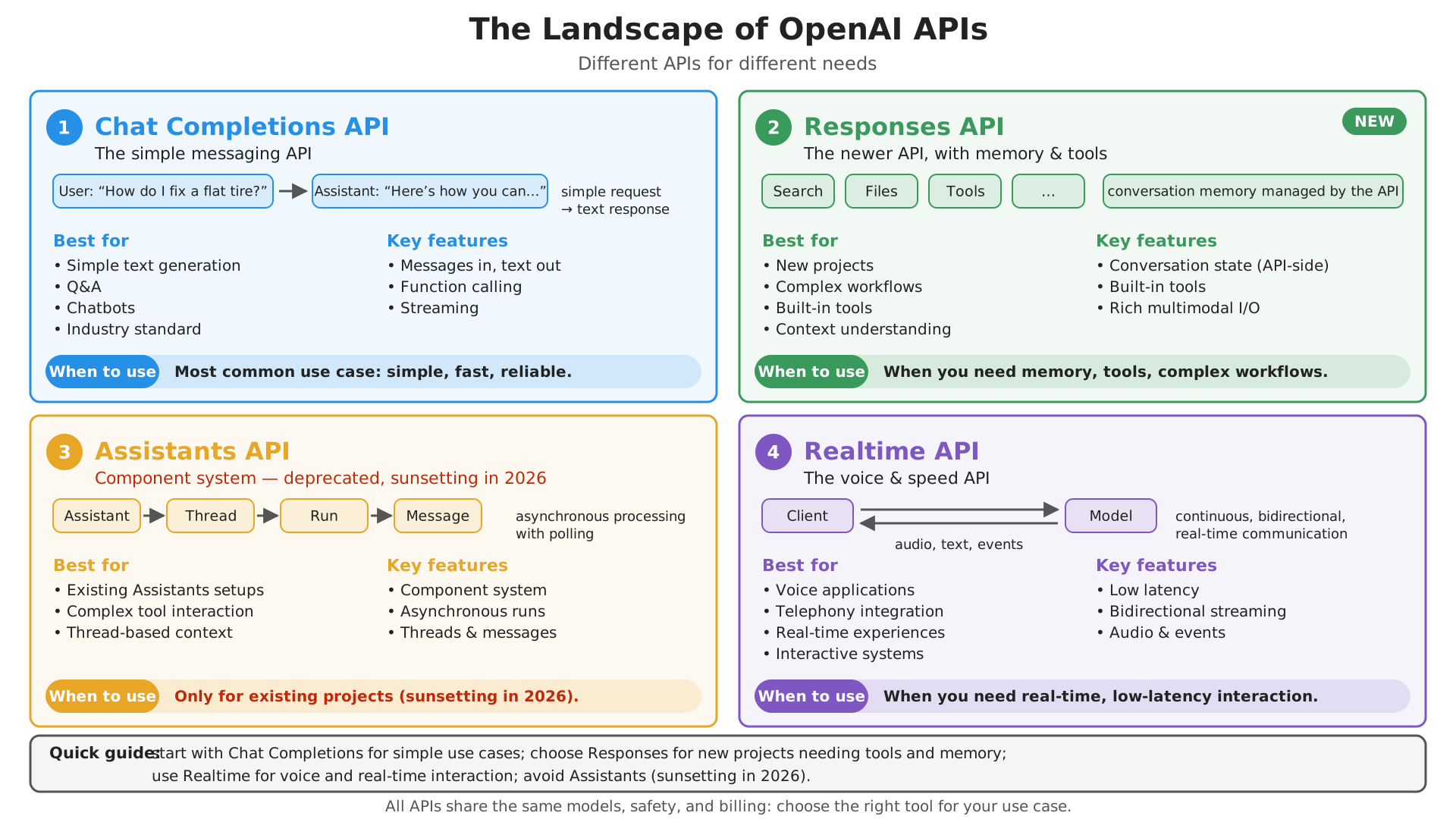
Client-side libraries for LLMs
Reference technology: OpenAI Client Libraries
About client libraries
-
Main providers – especially the ones exposing their own Web APIs – come with their own client libraries
- wrapping those APIs into custom SDKs for target programming languages (e.g. Python, JS, Java, etc.)
-
Two major didactical choices here (among the many possible ones):
- OpenAI Client lib flavoured for JavaScript, Python, .Net, Java, Go, Ruby, CLI
- it is the “reference” client, since OpenAI invented the first Web API for LLMs, and many other providers mimicked it
- LangChain flavoured for Python and JavaScript
- it is a third-party client library, which supports multiple providers and APIs (e.g. OpenAI, Anthropic, Google, Azure, etc.)
- it is more focused on orchestrating interactions with LLMs and tools, rather than just wrapping Web APIs
- used from the next lecture on
- OpenAI Client lib flavoured for JavaScript, Python, .Net, Java, Go, Ruby, CLI
OpenAI’s Chat Completion API with Python
-
This is the simplest and most common way to interact with OpenAI-like API providers, via the openai-python library
- just run
pip install openaito install it, into your (virtual) Python environment - in your Python scripts, just import the
openaimodule
- just run
-
Two orthogonal choices:
- sync (
OpenAI: each call blocks until done) vs. async (AsyncOpenAI: calls are coroutines, to beawaited, so that many can run concurrently) - non-streaming (
stream=False: the response is returned as a whole, after the model has finished generating it, which may take time) vs. streaming (stream=True: a stream of parts, as they are generated, so content is shown ASAP) - both clients support both modes: Example 1 below is sync + non-streaming, Example 2 is async + streaming, by choice
- sync (
-
In both cases, ingredients are essentially the same:
- Env vars (or command line arguments): to parametrize your program w.r.t. API keys, API providers’ base urls, model names, etc.
- Client: an object of type
openai.OpenAI(for sync) oropenai.AsyncOpenAI(for async) by which you interact with a model as provided by some provider- documented “by example” at https://github.com/openai/openai-python/blob/main/README.md
- Conversation history: literally a list of dictionaries, each one having two keys:
role(e.g. “system”, “user”, “assistant”) andcontent(actual text) - Chat completion request: a call to the
client.chat.completions.create()method, accepting the conversation history as input plus some additional parameters (e.g.temperature,max_tokens, etc.) and returning either the full response or a stream of response parts, depending on the parameterstream(respectivelyFalseorTrue) - Chat completion response: a
ChatCompletionobject (apydanticmodel, mirroring the JSON response) containing the model’s response, including the generated content (e.g. in.choices[0].message.content), plus some additional metadata (e.g.usage,model, etc.)- in principle, there could be multiple choices in the response (in practice is often just one): the idea is that the model may produce alternative responses at once
- documented here https://developers.openai.com/api/reference/resources/chat/subresources/completions/methods/retrieve
- The agent, i.e. the program exploiting the aforementioned functionalities to accomplish some task
- it must append the responses’ messages to the history, as the API is stateless (cf. Chat Completion concept)
Example 1: Sync CLI Chat (pt. 1)
-
Let’s first create the client out of OR’s base URL, API key, and target model:
import os
from openai import OpenAI

# connection parameters: env vars, with defaults (the API key is asked interactively, if missing)
base_url = os.environ.get("OPENAI_BASE_URL", "https://openrouter.ai/api/v1/")
api_key = os.environ.get("OPENAI_API_KEY") or input(f"Enter your API key for {base_url}: ")
model = os.environ.get("OPENAI_MODEL", "nvidia/nemotron-3-super-120b-a12b:free")

client = OpenAI(base_url=base_url, api_key=api_key)  # stateless: the conversation history is kept by us
notice that:
- class
OpenAI(...)initializes the client in a very customizable way - the
base_urlparameter, which commonly defaults to https://api.openai.com/v1, is set to OR’s base URL https://openrouter.ai/api/v1, unless specified otherwise via env vars - the
api_keyis not in the source file, but taken from env var, or stdin (viainput(...)), to avoid hardcoding it in the source code - the
model(passed later, in each request) must be set to some model available in the provider’s model zoo - env vars
OPENAI_BASE_URL,OPENAI_API_KEY,OPENAI_MODELare read viaos.environ.get(NAME, DEFAULT)(all optional)
- class
-
Let’s then initialize the conversation history with a system prompt, containing general instructions for the LLM, which make sense w.r.t. the task at hand
messages = [dict(role="system", content="Just chat with the user, be friendly and helpful. Do not think. Just answer.")]here one may give additional instructions to be followed in the rest of the conversation
- e.g. “always answer in english”, or “detect the user’s langauge and answer in the same language”, etc.
Example 1: Sync CLI Chat (pt. 2)
-
Finally, we can enter a loop in which we read the user’s input from the command line, send it to the model as a new message in the conversation, and print the model’s response back to the command line
try:  # Ctrl+C (KeyboardInterrupt) or Ctrl+D (EOFError) exit gracefully
    while True:
        user_text = input("you> ").strip()
        if not user_text:
            continue
        if (cmd := user_text.lower().strip()) in {"/exit", "/quit"}:  # sub-commands first
            break
        if cmd not in {"/retry"}:  # on /retry, the history already ends with the last user message
            messages.append(dict(role="user", content=user_text))
        try:  # the WHOLE history is sent at each request
            response = client.chat.completions.create(model=model, messages=messages)
        except Exception as exc:  # e.g. network errors, rate limits, invalid API key
            print(f"error> {exc}")
            continue
        answer = response.choices[0].message.content or ""  # one choice expected, by default
        print(f"assistant> {answer}")
        messages.append(dict(role="assistant", content=answer))  # the answer becomes part of the history
except (EOFError, KeyboardInterrupt):
    pass
print("Goodbye!")
notice that:
- external
try-exceptblock is used to catch user’sKeyboardInterrupt(e.g. Ctrl+C) orEOFError(e.g. Ctrl+D) to exit gracefully from the loop - user input is first looked for sub-commands (e.g.
/exit,/retry, etc.)/retryadds no new message, so the same history is re-sent, possibly getting a different answer
- non-sub-command input is then used to create a new message with role
user, which is appended to the conversation history (messageslist) - then, a chat completion request is sent to the
modelviaclient.chat.completions.create(...), with the conversation history as input - the model’s response is supposed to contain a single choice (
response.choices[0]), whose.message.contentis what we show to the usercontentmay beNone(e.g. on tool calls), hence theor ""
- external
Example 1: Sync CLI Chat (pt. 3)
-
Full code here
-
Example of interaction with the model (start with
poetry run python -m snippets -l llmaas -e 1, cf. how to run snippets):
Enter your API key for https://openrouter.ai/api/v1/: sk-or-v1-XXXXXXXXXXXXXXXXXXXXXXXXX
Using model: nvidia/nemotron-3-super-120b-a12b:free
Type '/exit' or '/quit' to stop. Type '/retry' to retry the last message.

you> hi there, what time is it?

assistant> Hi! I don’t have a real-time clock on my end. Could you tell me your time zone or city, and I’ll give you the current local time? If you’d prefer, I can also give you the current UTC time.

you> it's Cesena, in Italy

assistant> In Cesena, Italy right now it’s Central European Summer Time (CEST), which is UTC+2. I can’t see the exact current time here, but if you tell me the current UTC time (or your device’s time), I’ll convert it to Cesena time for you.

Example: if UTC is 13:00, then Cesena is 15:00. Want me to convert a specific time? Or you can just check your phone or a world clock for the exact minute and second.

you> ^CGoodbye!
- When you run it, pay attention to:
- time to get a response from the model (latency)
- you have no way to know which model is actually serving your request, do you?
- the model does not have access to real-time information, so it cannot answer questions about (e.g.) the current time
About Chat Completion API (pt. 1)
Request parameters which can be passed to client.chat.completions.create(...)
(cf. https://developers.openai.com/api/reference/resources/chat/subresources/completions/methods/create)
-
messages(list of dicts): the conversation history, as a list of messages, each one having arole(e.g. “system”, “user”, “assistant”) andcontent(actual text)messages = [ dict(role="system", content="When asked about time, ask location if missing, then call the `get_current_time` tool."), dict(role="user", content="What time is it?"), { "role": "assistant", "content": "What location should I use to check the current time?" }, { "role": "user", "content": "Cesena Italy" }, { "role": "assistant", "content": None, "tool_calls": [ { "id": "call_current_time_001", "type": "function", "function": dict(name="get_current_time", arguments="{\"location\":\"Cesena, Italy\"}") } ] }, dict(role="tool", tool_call_id="call_current_time_001", content="{\"location\":\"Cesena, Italy\",\"timezone\":\"Europe/Rome\",\"current_time\":\"2026-05-23T14:37:00+02:00\"}"), { "role": "assistant", "content": "The current time in Cesena, Italy is 14:37 on May 23, 2026."} ]- there could be other fields, especially in messages generated by the model (e.g. tool calls, reasoning traces, etc.)
tool_calls: the model asks the client to call some function (name+ JSON-encodedarguments), instead of answeringrole="tool": the function’s result, sent back by the client, linked to the call viatool_call_id- (tools are discussed in depth in the Agents lecture)
- there could be other fields, especially in messages generated by the model (e.g. tool calls, reasoning traces, etc.)
-
model(str): the name of the model to use for this request, which must be available in the provider’s model zoo -
temperature(float in0 .. 2): controls the randomness of the output, with higher values leading to more random output, and lower values leading to more deterministic output
About Chat Completion API (pt. 2)
Request parameters which can be passed to client.chat.completions.create(...) (cont.)
-
max_completion_tokens(int, default:None): an upper bound for the number of tokens that can be generated for a completion, including visible output tokens and reasoning tokens. -
n(int, default:1): the number of alternative completions to generate for each input message. The API will return a list ofchoices, each one containing a different completion. -
stream(bool, default:False): whether to receive the response as a stream of parts, as they are generated by the model, instead of waiting for the full response. IfTrue, the API will return an iterator that yields partial responses. -
response_format(dict, default:None): the format in which the model should return the response- value
{ "type": "text" }(default) means that the model should return a plain text response - value
{ "type": "json_object" }forces the model to produce a JSON output (assumes the schema of the object is described in the system prompt, or in some previous message) - value
{ "type": "json_schema", "json_schema": { "name": STRING, "description": STRING, "schema": {...}, "strict": BOOL } }forces the model to produce a JSON output matching the provided JSON schema, wherenameis mandatory,descriptionoptionally describes the schema to the model, andstrict: trueenables constrained decoding, guaranteeing that the output adheres to the schema- this is important to support structured output, explained in the next lecture
- value
-
stop(str or list of str, default:None): one or more sequences where the API will stop generating further tokens. The returned text will not contain the stop sequence.
About Chat Completion API (pt. 3)
Request parameters which can be passed to client.chat.completions.create(...) (cont.)
tool_choicecontrols which tools the model can use to solve the task at hand, and how to use them- value
nonemeans that the model cannot use any tool, and should rely on its own knowledge and capabilities to answer the user’s question - value
auto(default) means that the model can decide autonomously which tools to use, if any, based on the conversation history and the task at hand - value
requiredmeans that the model must use at least one tool to answer the user’s question, and cannot rely solely on its own knowledge and capabilities - further variants are available to finely control which tools the model can use
- value
About Chat Completion API (pt. 3, cont.)
-
tools(list of dicts): the list of tools that the model can use, each one described by a dictionary containing at least anameand adescription, and optionally some additional fields (e.g.parametersto describe the expected input for the tool, etc.)tools=[ dict( type="function", function={ "name": "get_current_time", "description": "Get the current local time for a given IANA timezone.", "parameters": { "type": "object", "properties": { "timezone": { "type": "string", "description": "An IANA timezone identifier, for example Europe/Rome" } }, "required": [ "timezone" ], "additionalProperties": False } } ), ]- type=
functiontools are described by their name, a natural language description of what they do, and a JSON schema describing the expected input for the tool (e.g. the parameters of the function)properties: the arguments and their types;required: the mandatory ones;additionalProperties: False: no other argument allowed
- OpenAI also supports
customtools, with free-text or grammar-constrained inputs (rarely supported by other providers)
- type=
About Chat Completion API (pt. 4)
What can you expect in the response of a chat completion request?
Responses are JSON objects containing many relevant metadata, explanation below in YAML syntax for better readability:
object: chat.completion # the type of the returned object
id: chatcmpl-abc123 # a unique identifier for this chat completion, for tracking and debugging purposes
model: gpt-4o-2024-08-06 # the actual model that served this request, which may differ from the requested one (e.g. due to dynamic routing)
created: 1738960610 # the Unix timestamp of when the chat completion was created
system_fingerprint: fp_50cad350e4 # a fingerprint of the backend configuration that served this request
service_tier: default # the processing tier used to serve the request
usage: # the usage statistics for this chat completion
  prompt_tokens: 13 # input tokens
  completion_tokens: 18 # output tokens
  total_tokens: 31 # total tokens (input + output)
choices: # list of choices generated by the model (usually just one)
- index: 0 # the index of this choice in the list of choices
  message: # the message generated by the model for this choice
    role: assistant
    content: null # the text of the answer, if any (here none, as the model asks for a tool call)
    tool_calls: # the tool calls requested by the model, if any
      - id: call_current_time_001 # a unique identifier for this tool call, to be referenced by the tool result
        type: function
        function:
          name: get_current_time # the name of the tool to be called
          arguments: "{\"timezone\":\"Europe/Rome\"}" # the arguments, as a JSON string
  finish_reason: tool_calls # why the model stopped: "stop" (natural end, or stop sequence), "length" (max_completion_tokens reached), "tool_calls", "content_filter"
  logprobs: null # the log probabilities of the generated tokens, if requested
- sampling parameters (besides
temperature):top_psamples only among the most likely tokens whose probabilities sum totop_p(nucleus sampling);presence_penalty/frequency_penaltydiscourage repeating tokens already generated - most commonly, one cares about the first choice (
choices[0]), and in particular about the generated message (choices[0].message.content), but the rest of the metadata can be useful for debugging, analysis, and cost control purposes
Example 2: Async CLI Chat with Streaming (pt. 1)
-
Client setup is very similar to the sync version, but we use
AsyncOpenAI(...)and keep the same env-driven configuration style:import asyncio import os from openai import AsyncOpenAI base_url = os.environ.get("OPENAI_BASE_URL", "https://openrouter.ai/api/v1/") api_key = os.environ.get("OPENAI_API_KEY") or input(f"Enter your API key for {base_url}: ") model = os.environ.get("OPENAI_MODEL", "nvidia/nemotron-3-super-120b-a12b:free") client = AsyncOpenAI(base_url=base_url, api_key=api_key) # same API as OpenAI, but methods are coroutinesnotice that:
AsyncOpenAI(...)is the async counterpart ofOpenAI(...)- we need module
asyncioto run the main async function, and to handle async calls in general
-
As the program is asynchronous, we need to define an
async def main():function, which will contain the main logic of our program, and then run it withasyncio.run(main())at the end of the scriptif __name__ == "__main__": raise SystemExit(asyncio.run(main())) # runs the event loop until main() completesasyncio.run(...)starts the event loop, and returnsmain()’s result, used as the process’ exit code byraise SystemExit(...)
Example 2: Async CLI Chat with Streaming (pt. 2)
-
The main function is structure more or less like the sync version, except for
await(suspendsmain()until the request is sent),stream=True,async for(iterates over chunks as they arrive), and.delta(detailed next):async def main() -> int: print("Type '/exit' or '/quit' to stop. Type '/retry' to retry the last message.") try: while True: user_text = input("you> ").strip() if not user_text: continue if (cmd := user_text.lower().strip()) in {"/exit", "/quit"}: break if cmd not in {"/retry"}: messages.append(dict(role="user", content=user_text)) try: # stream=True: the response is an (async) iterator of chunks, rather than a single object stream = await client.chat.completions.create(model=model, messages=messages, stream=True) except Exception as exc: print(f"\nerror> {exc}") continue answer_parts = [] print("assistant> ", end="", flush=True) try: async for item in stream: if not item.choices: # e.g. the last chunk, only carrying usage statistics continue chunk = item.choices[0].delta.content or "" # "delta": the new piece of text if not chunk: continue shown = chunk.replace("\n", "\nassistant> ") # prefix new lines, on screen only print(shown, end="", flush=True) # show it immediately answer_parts.append(chunk) # the raw text, for the history except Exception as exc: # streams may fail midway too print(f"\nerror> {exc}", flush=True) continue print(flush=True) answer = "".join(answer_parts) # the full answer, to be kept in the history messages.append(dict(role="assistant", content=answer)) except (EOFError, KeyboardInterrupt): pass print("Goodbye!") return 0
Example 2: Async CLI Chat with Streaming (pt. 2, cont.)
Differences w.r.t. the sync version are in the way we i. create the completion request, by setting stream=True to receive a stream of response parts, and by awaiting the response with async for instead of just for; and ii. consume the stream of response parts
stream = await client.chat.completions.create(..., stream=True) # create the request + open response stream
answer_parts = [] # buffer to store the parts of the answer as they arrive
async for item in stream:
    chunk = item.choices[0].delta.content or "" # get each chunk of the answer as it arrives (if any)
    print(chunk, end="", flush=True) # show it immediately
    answer_parts.append(chunk) # store the chunk in the buffer
messages.append(dict(role="assistant", content="".join(answer_parts))) # reconstruct the full answer and store it in the conversation history
- notice the
.deltafield in the response parts: the new piece of text, rather than the wholemessage - some chunks carry no
choicesat all (e.g. the last one, withusagestatistics only), so they are skipped - notice that partial responses should be printed with
print(..., end="", flush=True)to avoid buffering issues in the terminal
Example 2: Async CLI Chat with Streaming (pt. 3)
-
Full code here
-
Example of interaction (start with
poetry run python -m snippets -l llmaas -e 2):
Enter your API key for https://openrouter.ai/api/v1/: sk-or-v1-XXXXXXXXXXXXXXXXXXXXXXXXX
Using model: nvidia/nemotron-3-super-120b-a12b:free
Type '/exit' or '/quit' to stop. Type '/retry' to retry the last message.

you> hi bro

assistant> Hey! How’s it going? How can I help today? I can answer questions, explain things, help with writing or editing, brainstorm ideas, or assist with code—tell me what you need.

you> can you generate the first 20 verses of the divine comedy, in english?
assistant> Sure—do you want the first 20 lines from Inferno, Canto I in Henry Wadsworth Longfellow’s public-domain English translation, or would you prefer a different translation? I can paste exactly whichever you choose.

you> yeah that's fine

assistant> Here are the first 20 lines of Inferno, Canto I, from Henry Wadsworth Longfellow's translation of Dante Alighieri's *Divine Comedy*:
assistant>
assistant> Midway upon the journey of our life
assistant> I found myself within a forest dark,
assistant> For the strayed path had filled my soul with strife.
assistant> How hard a thing it is to tell what deep
assistant> And tangled wood this was, how wild and steep,
assistant> Which on my memory leaves so keen a fear!
assistant> So bitter is it, death is slight relief;
assistant> But to set forth the goodness that I found,
assistant> I'll speak of other things that there appeared.
assistant> I know not how I entered it, so deep
assistant> I had become in slumber at that hour
assistant> When I had wandered from the path of truth.
assistant>
assistant> But after I had reached a hill’s low foot,
assistant> Where the long valley terminating had
assistant> My fear, a place, I say, that any heart
assistant> With dread doth pierce; and when I looked above,
assistant> I saw its highest point already clothed
assistant> With rays of the planet that guides man aright
assistant> On every path. Then was the fear a while
assistant> Abated.
assistant>
assistant> Let me know if you’d like more!

you> Goodbye!
- When you run it, pay attention to:
- perceived latency (first token arrives earlier than full-response mode)
Notice: these are not Longfellow’s lines (his line 3 is “For the straightforward pathway had been lost”, cf. Wikisource): a confident hallucination
Example 3: CLI Chat with Attachments, via the Responses API (pt. 1)
Goal: the same chat as Example 2, via OpenAI’s Responses API (
POST /v1/responses), letting users attach files (pictures, PDFs, text) to their messages
- The Responses API is OpenAI’s newer API, which differs from Chat Completions in that:
- the system prompt is a parameter (
instructions=...), and the history is a list of typed items (input=[...]) - messages are lists of typed content parts:
input_text,input_image,input_file, … - streaming produces typed events (e.g.
response.created,response.output_text.delta,response.completed), rather than generic deltas - it can be stateful: the provider stores the history (
store=True), and the next request just points to the previous response (previous_response_id=...)
- the system prompt is a parameter (
- Portability is limited (cf. compatibility): Open Router and Ollama support it in its stateless flavour only
-
Client setup is the same as in Example 1, plus a command-line flag to choose between stateless and stateful mode:
parser = argparse.ArgumentParser(description="CLI Chat with Attachments, via the Responses API") parser.add_argument("--stateful", action="store_true", help="let the provider keep the history (OpenAI only)") args = parser.parse_args() base_url = os.environ.get("OPENAI_BASE_URL", "https://openrouter.ai/api/v1/") api_key = os.environ.get("OPENAI_API_KEY") or input(f"Enter your API key for {base_url}: ") model = os.environ.get("OPENAI_MODEL", "google/gemma-4-26b-a4b-it:free") # a free model that can see pictures client = OpenAI(base_url=base_url, api_key=api_key) INSTRUCTIONS = "Just chat with the user, be friendly and helpful. Answer questions about the attached files, if any."- the default model is multimodal, as users may attach pictures
Example 3: CLI Chat with Attachments, via the Responses API (pt. 2)
-
Files become content parts: text files are inlined, pictures and PDFs are encoded as data URLs (base64)
def attachment(path: Path) -> dict: """Turns a file into a content part of a message: pictures and PDFs are sent in base64, text files inline.""" mime = mimetypes.guess_type(path)[0] or "text/plain" if mime.startswith("text/"): return dict(type="input_text", text=f"<file name='{path.name}'>\n{path.read_text()}\n</file>") data_url = f"data:{mime};base64,{base64.b64encode(path.read_bytes()).decode()}" if mime.startswith("image/"): return dict(type="input_image", image_url=data_url) return dict(type="input_file", filename=path.name, file_data=data_url) # e.g. PDFs- inlined text is delimited by tags (
<file name='...'>), so that the model can tell files apart from the user’s text - alternatively, files can be uploaded once via the Files API (
client.files.create(...)), then referenced by ID (file_id=...) in any request: OpenAI-specific, though
- inlined text is delimited by tags (
-
The REPL handles the
/attach <path>command by accumulating content parts for the next message:if cmd.lower() == "/attach": if not (path := Path(arg.strip())).is_file(): print(f"error> no such file: {path}") continue attachments.append(attachment(path)) print(f"(attached {path.name}: it will be sent along with your next message)") continue # a message is a list of content parts: the attachments, then the text message = dict(role="user", content=[*attachments, dict(type="input_text", text=user_text)])
Example 3: CLI Chat with Attachments, via the Responses API (pt. 3)
-
Stateless vs. stateful requests, and the consumption of the stream of typed events:
        if args.stateful:  # we only send the new message, and point to the previous response (the provider has the rest)
            request = dict(input=[message], previous_response_id=previous_id, store=True)
        else:  # we send the whole history, and ask the provider NOT to store anything
            request = dict(input=[*history, message], store=False)
        answer = ""
        try:
            stream = client.responses.create(model=model, instructions=INSTRUCTIONS, stream=True, **request)
            print("assistant> ", end="", flush=True)
            for event in stream:  # typed events: we only need two kinds of them
                if event.type == "response.created":
                    response_id = event.response.id
                elif event.type == "response.output_text.delta":
                    print(event.delta, end="", flush=True)
                    answer += event.delta
            print()
        except Exception as exc:  # e.g. network errors, rate limits, unsupported features
            print(f"\nerror> {exc}")
            continue
        attachments = []  # sent: don't send them again
        previous_id = response_id
        history += [message, dict(role="assistant", content=answer)]
notice that:
- in stateless mode, the whole history is sent at each request (as in Examples 1 and 2), and
store=Falseasks the provider not to keep it - in stateful mode, only the new message is sent: fewer bytes per request (attachments are sent once), but the conversation lives on the provider’s servers (cf. data protection), and only OpenAI supports it
- we only care for two kinds of events:
response.created(to get the response’s ID) andresponse.output_text.delta(the new piece of text)
- in stateless mode, the whole history is sent at each request (as in Examples 1 and 2), and
Example 3: CLI Chat with Attachments, via the Responses API (pt. 4)
-
Full code here
-
Example of interaction (start with
poetry run python -m snippets -l llmaas -e 3, here with a local Ollama):
Using model: gemma4:e4b (stateless)
Type '/exit' or '/quit' to stop. Type '/attach <path>' to attach a file to your next message.
you> /attach data/passport-mario-rossi.png
(attached passport-mario-rossi.png: it will be sent along with your next message)
you> What is the nationality and birth date of this person? Be brief.
assistant> The nationality is **Bananense**, and the birth date is **March 15, 1985**.
you> And their name?
assistant> The name is **Mario Rossi**.
you> /attach data/regulations-phd.md
(attached regulations-phd.md: it will be sent along with your next message)
you> What is the age limit, if any? One sentence.
assistant> There is no age limit for admission to the PhD Programme.
you> Goodbye!
- Try
--statefulon Ollama, then ask “what is my name?” after telling it: the model forgets, asprevious_response_idis silently ignored
Compatibility is not just “the request is accepted”: the semantics must be preserved too, and silent incompatibilities are the worst ones
Example 3: Project Structure
Files of this example, in the lab-snippets repository:
lab-snippets/
├── data/
│   ├── passport-mario-rossi.png      # files to attach, e.g. pictures
│   └── regulations-phd.md            # ... or text
├── snippets/
│   └── lecture_llmaas/
│       └── example3/
│           ├── __init__.py
│           └── repl_chat_responses.py  # the chat
└── pyproject.toml                    # dependencies of all snippets
- run it with
poetry run python -m snippets -l llmaas -e 3 [--stateful](cf. how to run snippets)- set the environment variables
OPENAI_API_KEY(and, optionally,OPENAI_BASE_URL,OPENAI_MODEL), as for Example 1 --statefulrequires OpenAI as the provider (e.g.OPENAI_BASE_URL=https://api.openai.com/v1/)
- set the environment variables
Focus on Anthropic’s Client Library for Python
Example 1 (bis): the same CLI Chat with Anthropic’s Messages API (pt. 1)
Goal: re-implement Example 1 with a different API and client library, to appreciate analogies and differences
- We use the official
anthropicPython SDK (pip install anthropic), which speaks Anthropic’s Messages API (POST /v1/messages) - No need for an Anthropic account: Ollama exposes an Anthropic-compatible API too, so we can run everything locally (and for free)
- Open Router supports the Messages API as well (docs): set
ANTHROPIC_BASE_URL=https://openrouter.ai/apiand your OR key
- Open Router supports the Messages API as well (docs): set
-
Client creation is analogous to the OpenAI one (base URL, API key, model name):
import os from anthropic import Anthropic # defaults point to Ollama, which exposes an Anthropic-compatible API too (the API key is ignored) base_url = os.environ.get("ANTHROPIC_BASE_URL", "http://localhost:11434") api_key = os.environ.get("ANTHROPIC_API_KEY", "ollama") model = os.environ.get("ANTHROPIC_MODEL", "gemma4:e2b") client = Anthropic(base_url=base_url, api_key=api_key)- class
Anthropic(...)is the client, configured via env varsANTHROPIC_BASE_URL,ANTHROPIC_API_KEY,ANTHROPIC_MODEL, defaulting to the local Ollama (http://localhost:11434,gemma4:e2b) - the API key is mandatory for the SDK, but ignored by Ollama (any string works)
- the SDK appends
/v1/messagesto the base URL by itself
- class
-
Difference: the system prompt is not a message, but a separate parameter, hence the history starts empty:
system = "Just chat with the user, be friendly and helpful. Do not think. Just answer."  # NOT part of the messages
messages = []
Example 1 (bis): the same CLI Chat with Anthropic’s Messages API (pt. 2)
-
The REPL loop is identical to Example 1, except for the request–response step:
        try:  # max_tokens is mandatory here (raise it for reasoning models: thinking tokens count too)
            response = client.messages.create(model=model, system=system, messages=messages, max_tokens=2048)
        except Exception as exc:
            print(f"error> {exc}")
            continue
        # no "choices": the response content is a list of typed blocks (text, thinking, tool_use, ...)
        answer = "".join(block.text for block in response.content if block.type == "text")
        print(f"assistant> {answer}")
        messages.append(dict(role="assistant", content=answer))
notice that:
client.messages.create(...)replacesclient.chat.completions.create(...)system=...is passed asidemessages=...max_tokensis mandatory (raise it for reasoning models, as thinking tokens count too: an empty answer is the typical symptom)- the response has no
choices:response.contentis directly a list of typed content blocks (text,thinking,tool_use, …), so we concatenate thetextones - messages in the history still have
role(userorassistant) andcontent(a string, or a list of blocks)
-
Full code here: run it with
poetry run python -m snippets -l llmaas -e 1bis, withollama serveactive andgemma4:e2bpulled
Using model: gemma4:e2b
Type '/exit' or '/quit' to stop. Type '/retry' to retry the last message.
you> say hi in 3 words
assistant> Hi there!
you> and now in italian
assistant> Ciao a tutti!
you> Goodbye!
Analogies and differences among providers’ APIs
| Feature | OpenAI Chat Completions | OpenAI Responses | Anthropic Messages | Google generateContent |
|---|---|---|---|---|
| Endpoint | POST /v1/chat/completions |
POST /v1/responses |
POST /v1/messages |
POST /v1beta/models/{model}:generateContent |
| Python SDK call | client.chat.completions.create(...) |
client.responses.create(...) |
client.messages.create(...) |
client.models.generate_content(...) |
| System prompt | message with role="system" (or developer) |
instructions=... parameter |
system=... parameter |
config.system_instruction |
| History | messages=[{role, content}] |
input=[typed items] (or previous_response_id, server-side state) |
messages=[{role, content}] |
contents=[{role, parts}] |
| Roles | system, user, assistant, tool |
user, assistant + typed items |
user, assistant |
user, model |
| Output | choices[0].message.content |
output_text / output items |
content (list of typed blocks) |
candidates[0].content.parts (SDK: .text) |
| Max tokens | optional (max_completion_tokens) |
optional (max_output_tokens) |
mandatory (max_tokens) |
optional (max_output_tokens) |
| Tools | tools + tool_calls / role="tool" messages |
tools + function_call / function_call_output items |
tools + tool_use / tool_result blocks |
tools + functionCall / functionResponse parts |
| Structured output | response_format (JSON schema) |
text.format (JSON schema) |
tool-based, or JSON schema output (newer models) | response_mime_type + response_schema |
| Streaming | stream=True (deltas) |
stream=True (typed events) |
stream=True / messages.stream(...) (typed events) |
generate_content_stream(...) |
| Supported by Ollama | ✓ | ~ | ~ | × |
(cf. OpenAI, Anthropic, Google API references; Ollama’s OpenAI and Anthropic compatibility pages)
Same metamodel everywhere (model + instructions + ordered history of role-tagged, possibly multimodal, messages $\rightarrow$ next message + usage), different syntax: switching provider means rewriting the adapter layer, not the application logic
Exercise 1: Caching Sync Requests
Problem: when experimenting with programmatic LLM interfaces, one does a lot of trial and erros, possibly consuming credits, or wasting attempts w.r.t. rate limits, etc.
Idea: implement a simple caching mechanism for your program, so that you can store the responses of the model for given inputs, and reuse them when the same inputs are encountered again (also good for reproducibility and debugging purposes)
Code: put your solution in
snippets/lecture_llmaas/exercise1/oflab-snippets, and run it viapoetry run python -m snippets -l llmaas -x 1
TO-DO List
- Implement some caching mechanism for the Sync CLI Chat program, so that Chat Completion requests are cached on the file system before being issued
- Upon doing a new request to the model, first check if the same request has already been made before, and if so, return the cached response instead of issuing a new request to the model
Exercise 1: Caching Sync Requests (cont.)
Decision points and hints
- Where to store the cache?
- e.g. in local untrucked folder, temp folder, home sub-folder, etc.
- How to index the caches? A.k.a. when a cache is hit?
- same last message? same conversation history? same model and parameters? same temperature? same model?
- How to store the cache?
- e.g. as YAML/JSON files, with a naming convention based on the cache index?
- how to simply cache lookup then?
- How to restructure the code?
How to test it?
- run the program, and try to send the same message twice, to see if the second time the response is returned from the cache (e.g. by printing a message like “Cache hit! Returning cached response.”), and check that the response is indeed the same as the first time
- try to change the message slightly (e.g. by adding a punctuation mark), and see that the cache is not hit, and a new request is sent to the model, and check that the response is different from the first time
Solution: a walkthrough follows in the next (vertical) column — try on your own first!
Exercise 1: Caching Sync Requests — Solution
⚠️ Spoiler alert: the walkthrough of the solution of Exercise 1 is about to start
- do not proceed until you have attempted the exercise on your own!
- press → to skip the solution, ↓ to see it
- the solution’s code is on the
masterbranch oflab-snippets- while students are expected to clone the
exercisesbranch, where it is just a placeholder
- while students are expected to clone the
Exercise 1 — Solution: where to store, and when is it a hit?
# decision 1 (where?): a local, untracked folder (cf. .gitignore), configurable via env var
CACHE_DIR = Path(os.environ.get("LLM_CACHE_DIR", ".llm-cache"))


# decision 2 (when is it a hit?): same request = same provider, model, and messages (i.e. the whole history, not just the last message),
# plus any other parameter (e.g. temperature): all of them affect the answer, so all of them are part of the key
def cache_key(**request) -> str:
    canonical = json.dumps(request, sort_keys=True, ensure_ascii=False)  # same request => same string (keys are sorted)
    return hashlib.sha256(canonical.encode()).hexdigest()  # a fixed-length, file-name-friendly digest of that string
- where: a local, untracked folder (
.llm-cache/, git-ignored), overridable via theLLM_CACHE_DIRenv var- alternatives: the temp folder (lost on reboot), or
~/.cache/...(shared among projects)
- alternatives: the temp folder (lost on reboot), or
- when: the cache key covers the whole request: provider, model, whole history, and any other parameter (e.g.
temperature)- keying on the last message only is a pitfall: “and now in italian” means different things in different conversations
- how: the request is serialised as canonical JSON (
sort_keys=True), then hashed (SHA-256) into a fixed-length, file-name-friendly keyjson.dumps(...): object → JSON string (ensure_ascii=Falsekeeps non-ASCII chars as they are);hashlib.sha256(bytes).hexdigest(): the hash, as a hex stringPath(frompathlib): object-oriented file-system paths, composable via/
Exercise 1 — Solution: how to store, and lookup
# decision 3 (how to store?): one JSON file per request, named after its key, so that lookup is just a file-existence check
def cached_completion(client: OpenAI, **request) -> str:
    """Like client.chat.completions.create(**request), but returns just the answer's text, from the cache if possible."""
    file = CACHE_DIR / f"{cache_key(base_url=str(client.base_url), **request)}.json"
    if file.exists():
        print("# Cache hit! Returning cached response.")
        return json.loads(file.read_text())["answer"]
    response = client.chat.completions.create(**request)  # cache miss: actually call the model
    answer = response.choices[0].message.content or ""
    CACHE_DIR.mkdir(parents=True, exist_ok=True)
    # the request is stored too, for debugging (and reproducibility): one can see what produced the answer
    file.write_text(json.dumps(dict(request=request, answer=answer), indent=2, ensure_ascii=False))
    return answer
- one JSON file per request, named after its key $\Rightarrow$ lookup is just a file-existence check (no index to maintain)
- the request is stored next to the answer: human-readable, useful for debugging and reproducibility
Path’s.exists(),.read_text(),.write_text(...),.mkdir(parents=True, exist_ok=True)do the I/O;json.loadsparses JSON backclient.base_urlenters the key too, so that different providers do not share entries
cached_completionhas the same parameters asclient.chat.completions.create, so it is a drop-in replacement- only the answer’s text is cached (not the whole response object), which is all the REPL needs
Exercise 1 — Solution: restructuring the code
    try:
        while True:
            user_text = input("you> ").strip()
            if not user_text:
                continue
            if (cmd := user_text.lower().strip()) in {"/exit", "/quit"}:
                break
            if cmd not in {"/retry"}:
                messages.append(dict(role="user", content=user_text))
            try:
                answer = cached_completion(client, model=model, messages=messages)  # was: client.chat.completions.create(...)
            except Exception as exc:
                print(f"error> {exc}")
                continue
            print(f"assistant> {answer}")
            messages.append(dict(role="assistant", content=answer))
- the REPL of Example 1 is unchanged, except for the one line calling the model
- since the key covers the whole history, replaying the same conversation hits the cache at every turn
- try: send the same messages twice (restarting the program), and watch for
# Cache hit!
- try: send the same messages twice (restarting the program), and watch for
- beware: with a cache,
/retryreturns the same answer (the request is identical!): caching trades variety for cost and reproducibility
Exercise 1 — Solution: Project Structure
Files of this solution, in the lab-snippets repository (master branch):
lab-snippets/
├── snippets/
│   └── lecture_llmaas/
│       ├── example1/
│       │   └── repl_chat_openai.py  # the starting point
│       └── exercise1/
│           ├── __init__.py
│           └── repl_chat_cached.py  # the solution
└── pyproject.toml # dependencies of all snippets- run it with
poetry run python -m snippets -l llmaas -x 1(cf. how to run snippets)- set the environment variables
OPENAI_API_KEY(and, optionally,OPENAI_BASE_URL,OPENAI_MODEL), as for Example 1, plusLLM_CACHE_DIR
- set the environment variables
When things go wrong: errors, rate limits, and costs
- Requests may fail, with HTTP status codes worth distinguishing:
400(bad request, e.g. unsupported parameter),401(wrong API key),402(no credits left, on OR): fix the request, do not retry429(rate limit exceeded): wait, then retry; theRetry-Afterheader (if any) says how long5xx(server-side failure, overload): retry later, with exponential backoff
- In the
openaiSDK, they surface as exceptions:openai.RateLimitError(429),openai.APIStatusError(any other status, with.status_code),openai.APIConnectionError(network)- the client already retries some of them (2 times by default, cf. the
max_retriesconstructor parameter)
- the client already retries some of them (2 times by default, cf. the
- Each response carries its usage (
prompt_tokens,completion_tokens, …): log it to keep track of costs- OR also adds
usage.cost(in credits, i.e. USD), cf. the response above
- OR also adds
Exercise 2: Retry and Exponential Backoff
Problem: when interacting with LLMs via Web APIs, it may happen that some requests fail due to transient issues (e.g. network errors, rate limits, etc.)
Solution: it is good practice to implement some (configurable) retry mechanism with (configurable) exponential backoff to handle such cases gracefully
Code: put your solution in
snippets/lecture_llmaas/exercise2/oflab-snippets, and run it viapoetry run python -m snippets -l llmaas -x 2
TO-DO List
- Implement a retry + delay mechanism for the Sync CLI Chat program, so that
- when a request to the model fails, the program automatically retries the request after a certain delay, up to a maximum number of retries
- the delay between retries increases exponentially (e.g. 1s, 2s, 4s, 8s, etc.) to avoid overwhelming the server and to give it some time to recover from transient issues
- Let all these parameters (e.g. number of retries, initial delay, backoff factor, etc.) be configurable via env vars or command line arguments (with smart defaults)
Exercise 2: Retry and Exponential Backoff (cont.)
Decision points and hints
- How to detect a failed request?
- e.g. catch exceptions from the client library, check HTTP status codes, etc.
- How to implement the retry mechanism?
- e.g. with a simple loop and
try-exceptblock, or with a more sophisticated library liketenacity?
- e.g. with a simple loop and
- How to implement the exponential backoff?
- e.g. with a simple calculation based on the retry count, or with a library like
tenacitythat has built-in support for exponential backoff
- e.g. with a simple calculation based on the retry count, or with a library like
- How to make the parameters configurable?
- e.g. via env vars, command line arguments, or a configuration file? consider using
argparsefor command line arguments, andos.getenvfor env vars
- e.g. via env vars, command line arguments, or a configuration file? consider using
- How to restructure the code?
- e.g. separate the retry logic into a decorator or a helper function, to keep the main logic of the program clean and focused on the chat interaction
How to test it?
- run the program, and simulate a transient failure (e.g. by disconnecting the network, or by sending too many requests to trigger rate limits), and see that the program retries the request with increasing delays, and eventually succeeds or gives up after the maximum number of retries
- try to configure the parameters (e.g. number of retries, initial delay, backoff factor) and see that the retry behavior changes accordingly (e.g. more retries, longer delays, etc.)
Solution: a walkthrough follows in the next (vertical) column — try on your own first!
Exercise 2: Retry and Exponential Backoff — Solution
⚠️ Spoiler alert: the walkthrough of the solution of Exercise 2 is about to start
- do not proceed until you have attempted the exercise on your own!
- press → to skip the solution, ↓ to see it
- the solution’s code is on the
masterbranch oflab-snippets- while students are expected to clone the
exercisesbranch, where it is just a placeholder
- while students are expected to clone the
Exercise 2 — Solution: how to detect a failure?
# decision 1 (how to detect a failure?): the client raises exceptions; only some of them are TRANSIENT, i.e. worth a retry
TRANSIENT_ERRORS = (
    openai.APIConnectionError,  # network errors (including timeouts)
    openai.RateLimitError,  # HTTP 429: too many requests
    openai.InternalServerError,  # HTTP 5xx: the provider is in trouble
)  # others (e.g. openai.AuthenticationError, openai.BadRequestError) would fail again: retrying them only wastes time
- the client library signals failures by raising exceptions, one class per kind of error (no need to inspect HTTP status codes)
- only transient errors are worth a retry: network issues, rate limits (HTTP 429), server errors (HTTP 5xx)
- pitfall: retrying every exception (e.g. a wrong API key, or a malformed request) only wastes time, as it would fail again
Exercise 2 — Solution: retry loop and exponential backoff
# decision 2 (how to retry?): a plain loop + try/except, in a helper function wrapping ANY call (no extra library needed)
def with_retries(call, retries: int = 3, initial_delay: float = 1.0, backoff: float = 2.0, sleep=time.sleep):
    """Calls call(), retrying it up to `retries` times upon transient errors, waiting
    initial_delay, initial_delay * backoff, initial_delay * backoff^2, ... seconds between attempts."""
    for attempt in range(retries + 1):  # 1 attempt + `retries` retries
        try:
            return call()
        except TRANSIENT_ERRORS as error:
            if attempt == retries:  # no more retries: give up, letting the caller handle the error
                raise
            delay = initial_delay * backoff ** attempt  # decision 3: exponential backoff, e.g. 1s, 2s, 4s, 8s, ...
            print(f"# Attempt {attempt + 1} failed ({type(error).__name__}), retrying in {delay:g}s...")
            sleep(delay)  # `sleep` is a parameter, so that tests can replace it, and not actually wait
- a plain
forloop +try/except, in a helper function wrapping any call (passed as a function)- alternatively: the
tenacitylibrary, providing retry decorators with built-in backoff
- alternatively: the
- delays grow as $d_0 \cdot b^{k}$ (e.g. 1s, 2s, 4s, 8s): after the last retry, the error is re-raised to the caller
sleepis a parameter, so that tests can replace it, and not actually wait- refinement: add random jitter to the delays, so that many clients do not retry all at once
Exercise 2 — Solution: making parameters configurable
# decision 4 (how to configure?): argparse for command-line arguments, whose defaults come from env vars, whose defaults are hard-coded
def parse_args(args=None) -> argparse.Namespace:
    parser = argparse.ArgumentParser(description="Sync CLI Chat with retries and exponential backoff")
    parser.add_argument("--retries", type=int, default=int(os.environ.get("LLM_RETRIES", 3)), help="max number of retries (default: 3)")
    parser.add_argument("--initial-delay", type=float, default=float(os.environ.get("LLM_INITIAL_DELAY", 1.0)), help="delay before the 1st retry, in seconds (default: 1)")
    parser.add_argument("--backoff", type=float, default=float(os.environ.get("LLM_BACKOFF", 2.0)), help="multiplier of the delay, at each retry (default: 2)")
    return parser.parse_args(args)
argparsefor command-line arguments, whose defaults come from env vars, whose defaults are hard-codedadd_argument(name, type=..., default=..., help=...)declares an option;parse_args()returns aNamespacewith one attribute per option (--initial-delay→config.initial_delay)- precedence: CLI arguments > env vars > defaults, e.g.
poetry run python -m snippets -l llmaas -x 2 --retries 5 --backoff 3
    # beware: the OpenAI client ALREADY retries twice, by default (with backoff), so we disable that, to be in control
    client = OpenAI(base_url=base_url, api_key=api_key, max_retries=0)
- pitfall: the
OpenAIclient already retries twice by default (with backoff): it is disabled here, to be in control (and to avoid multiplying retries)
Exercise 2 — Solution: restructuring the code
    try:
        while True:
            user_text = input("you> ").strip()
            if not user_text:
                continue
            if (cmd := user_text.lower().strip()) in {"/exit", "/quit"}:
                break
            if cmd not in {"/retry"}:
                messages.append(dict(role="user", content=user_text))
            try:  # decision 5 (how to restructure?): the call is wrapped in a lambda, the rest of the REPL is unchanged
                response = with_retries(lambda: client.chat.completions.create(model=model, messages=messages),
                                        config.retries, config.initial_delay, config.backoff)
            except Exception as exc:  # non-transient errors, or transient ones persisting after all retries
                print(f"error> {exc}")
                continue
            answer = response.choices[0].message.content or ""
            print(f"assistant> {answer}")
            messages.append(dict(role="assistant", content=answer))
- the call to the model is wrapped in a
lambda, and passed towith_retries: the rest of the REPL is unchanged - the outer
exceptcatches non-transient errors, and transient ones persisting after all retries - to test it: disconnect the network (or point
OPENAI_BASE_URLto an unreachable host) and watch the delays grow
Exercise 2 — Solution: Project Structure
Files of this solution, in the lab-snippets repository (master branch):
lab-snippets/
├── snippets/
│   └── lecture_llmaas/
│       ├── example1/
│       │   └── repl_chat_openai.py  # the starting point
│       └── exercise2/
│           ├── __init__.py
│           └── repl_chat_retry.py  # the solution
└── pyproject.toml # dependencies of all snippets- run it with
poetry run python -m snippets -l llmaas -x 2 [--retries N] [--initial-delay SECONDS] [--backoff FACTOR](cf. how to run snippets)- set the environment variables
OPENAI_API_KEY(and, optionally,OPENAI_BASE_URL,OPENAI_MODEL), as for Example 1, plus (optionally)LLM_RETRIES,LLM_INITIAL_DELAY,LLM_BACKOFF
- set the environment variables
What’s next?
- We now know how to send requests to LLMs, and how to receive their responses, in a robust way
- Yet, what to write in those requests is still an open question:
- how to design prompts that reliably elicit the desired behaviour?
- how to make responses machine-readable, so that programs can process them?
- These are the topics of the Prompt Engineering & Structured Outputs lecture
Check your understanding
-
Answer in your own words, motivating your conclusions and using examples where useful.
-
Questions asking whether something is possible or desirable require more than a yes/no answer.
-
Implementation questions can be answered with an explanation or pseudocode unless executable code is explicitly requested.
-
Labels identify the primary learning target:
- notions (knowledge), reasoning (drawing conclusions), or know-how (applying knowledge).
- theoretical questions are independent of particular technologies; practical questions concern their use.
-
Practical answers should identify the technology used, without requiring memorisation of product-specific details (model names, prices, API signatures, versions, limits).
Check your understanding (1/6)
Models and deployment
-
[notions, theoretical] How does an application access an LLM as a service? Distinguish the model, inference runtime, service provider, Web API, and client library. What changes when inference runs locally?
-
[know-how, practical] How would you use a model zoo (catalogue) to find a model that your application can run or access? What can you learn from its name, variants, and model card, and what would you still need to verify?
-
[notions, theoretical] What is model quantization? Explain its purpose and trade-offs. Is choosing the smallest available representation always a good idea?
Check your understanding (2/6)
Models and deployment
-
[know-how, theoretical] How would you estimate whether a model can run on a given machine? Explain why its download size or number of active parameters alone may be misleading, and how the length of a conversation affects the estimate.
-
[know-how, practical] How would you make a model available locally through Ollama and connect an application to it? If generation were unexpectedly slow, how would you investigate?
-
[reasoning, practical] What does an aggregator such as OpenRouter add to direct access to a provider? Distinguish routing among models from routing among providers, and discuss what changes when you supply your own provider credentials.
Check your understanding (3/6)
Requests, responses, and portability
-
[know-how, practical] How would you configure an LLM client so that it can connect to different services without editing its source code? What precautions are needed when handling API keys?
-
[know-how, theoretical] How would you estimate and monitor the cost of a conversation with a hosted LLM? Why might the visible length of its answers be a poor estimate of the bill?
-
[notions, theoretical] How can a stateless API support a conversation? Explain the role of message history and message roles, and contrast this with an API that stores conversation state on the server.
-
[know-how, practical] How would you control the generation of an LLM response through request parameters? Discuss controls over sampling, repetition, and termination, and explain how you would check which controls a service supports.
Check your understanding (4/6)
Requests, responses, and portability
-
[reasoning, theoretical] A request succeeds, but the returned text is empty or appears incomplete. Does this necessarily indicate a failure? What information besides the text would help you interpret the response?
-
[reasoning, practical] A service advertises an OpenAI-compatible API. Is changing the client’s base URL, key, and model enough to migrate an application to it? Explain what compatibility does and does not guarantee.
-
[notions, practical] Compare two LLM APIs with different request and response structures. What concepts do they share, and what must an application translate between them?
-
[know-how, theoretical] How would you implement a command-line chat over a stateless completion API? Distinguish continuing a conversation, retrying a failed request, and asking for an alternative to a successful answer.
Check your understanding (5/6)
Responsiveness and reliability
-
[reasoning, theoretical] What is the difference between asynchronous requests and streamed responses? Can either be used without the other, and what does each improve?
-
[know-how, practical] How would you consume a streamed LLM response in a client application? Explain how you would keep the display and conversation history consistent if the stream ended unexpectedly.
-
[know-how, theoretical] How would you design a persistent cache of LLM responses? What makes two requests equivalent for caching, and how could you avoid returning an answer from the wrong conversation or service?
-
[reasoning, theoretical] What are the benefits and limitations of caching when experimenting with LLMs? Discuss its effect on reproducibility, generating alternative answers, and observing changes to the model.
Check your understanding (6/6)
Responsiveness and reliability
-
[know-how, practical] How would you decide whether to retry a failed API request? Give examples of failures that call for waiting and failures that call for changing the request or configuration.
-
[reasoning, theoretical] Why use bounded retries with exponential backoff and jitter? What could go wrong if both the application and its client library independently retry requests?
-
[know-how, theoretical] How would you test caching and retry behaviour without spending API credits or waiting through real delays? What cases would distinguish a correct implementation from one that only works on successful requests?
Lecture is Over
Compiled on: 2026-10-22 — printable version