Prompt Engineering & Structured Outputs
Intelligent Agents — Module 2
A.Y. 2026/2027
Giovanni Ciatto
Compiled on: 2026-10-22 — printable version
Outline
- Running example: the PhD admission committee’s assistant
- Anatomy of a prompt: what a prompt is made of, and some general best practices
- Structured outputs: how to get machine-readable responses out of LLMs
- first with OpenAI’s client library, then with LangChain, which we’ll keep using from then on
- Exercise 1: checklist scoring
- Prompting techniques: zero-shot, few-shot, chain-of-thought, self-consistency, prompt chaining
- Reasoning models: models which “think” before answering, and how to control how much they think
- Context management: context windows, token budgets, compaction, prompt caching
- Exercise 2: ID documents extraction
Validating generative software is the topic of the next lecture
Recall: we assume the reader is familiar with the Chat Completion API, and with the notion of prompt templates from previous lectures
Running example
Admission committee assistant for PhD applications evaluation
-
3 candidates, and as many applications, with their passport, transcript of records, and presentation letter (in natural language)
-
we want to extract structured information from these documents (e.g. name, age, grades, research experience, etc.) to ease evaluation

- Transcript of records
- Presentation letter
- letter is very positive
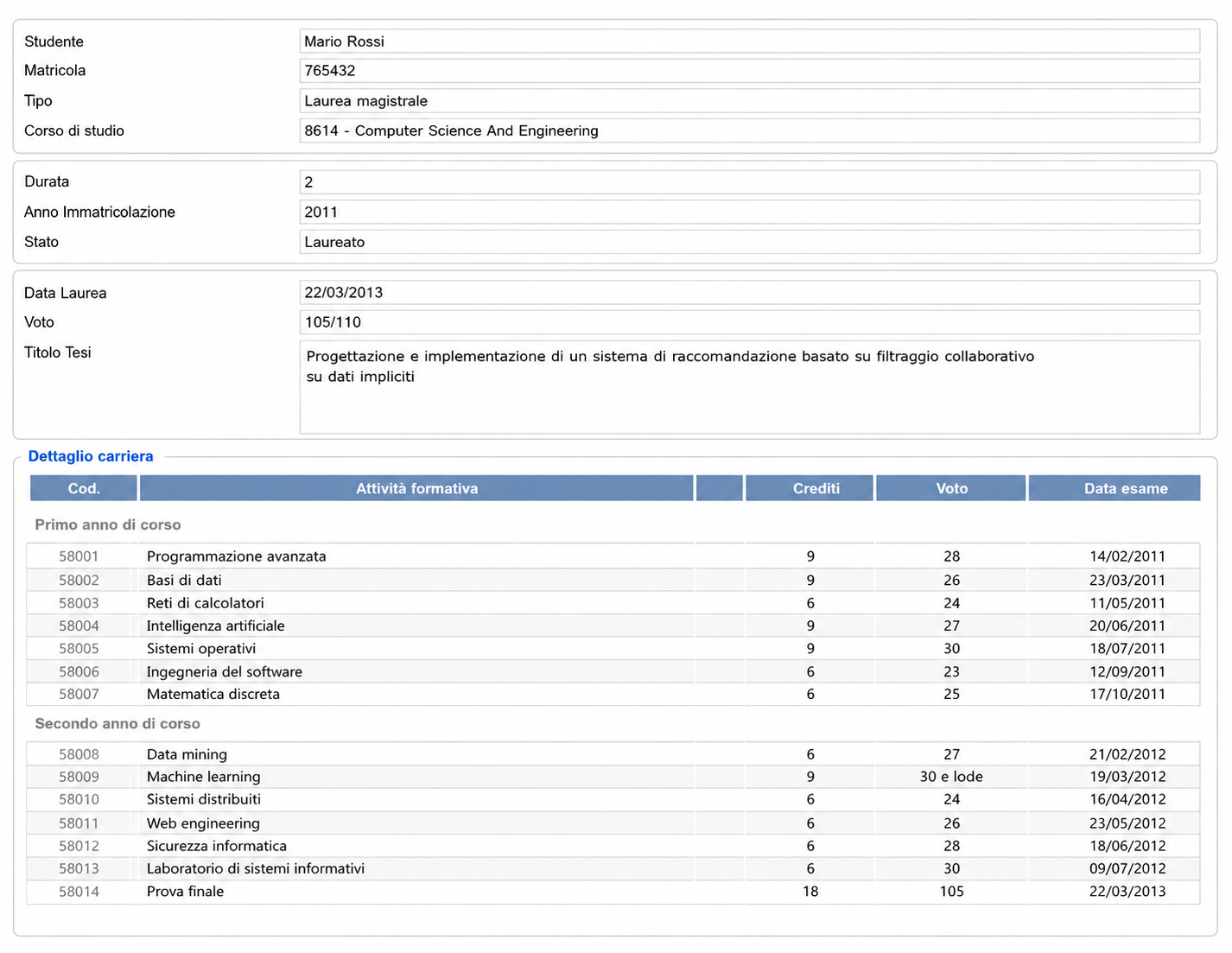

- Transcript of records
- Presentation letter
- letter contains some criticisms
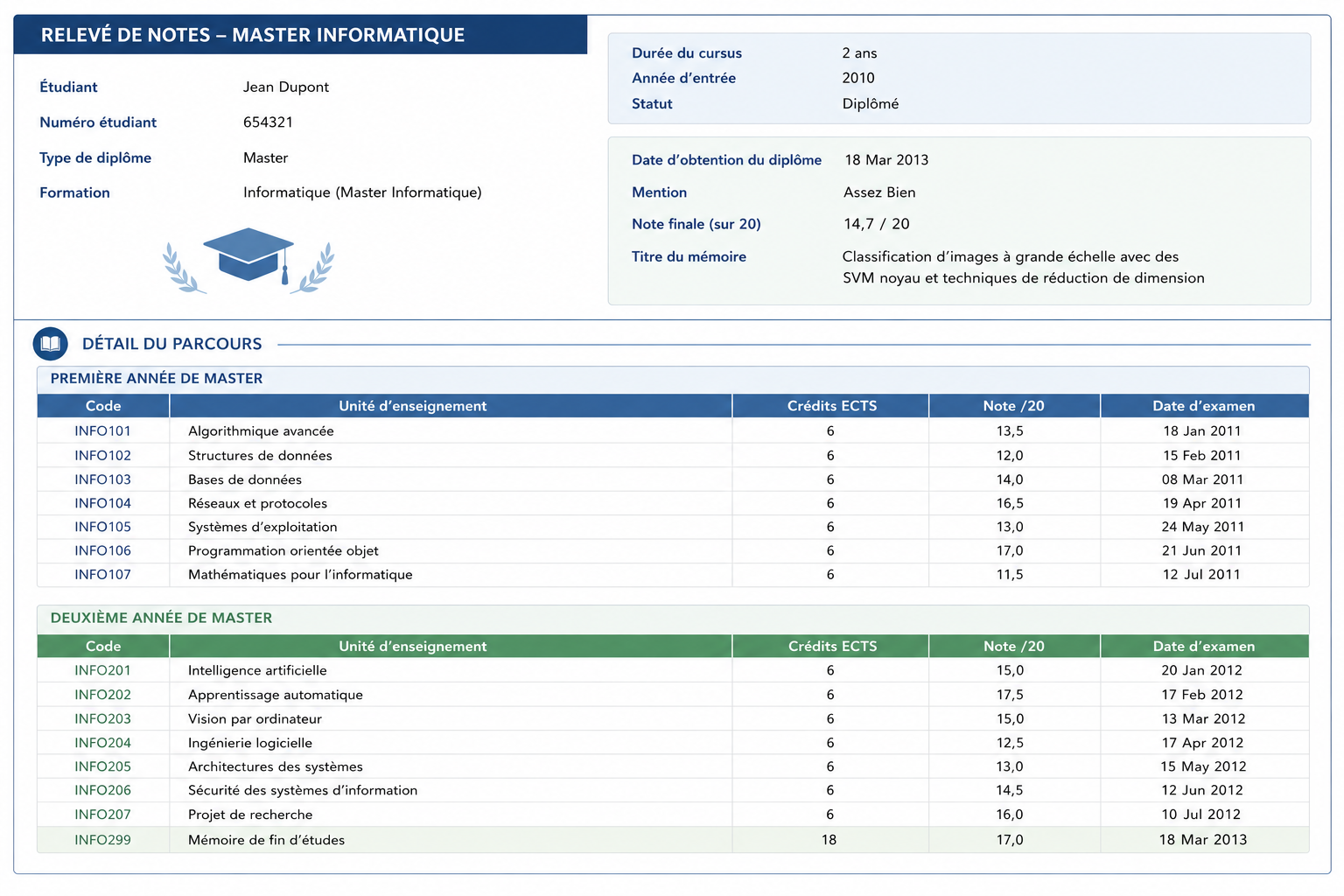

- Transcript of records
- Presentation letter
- letter is positive but shallow
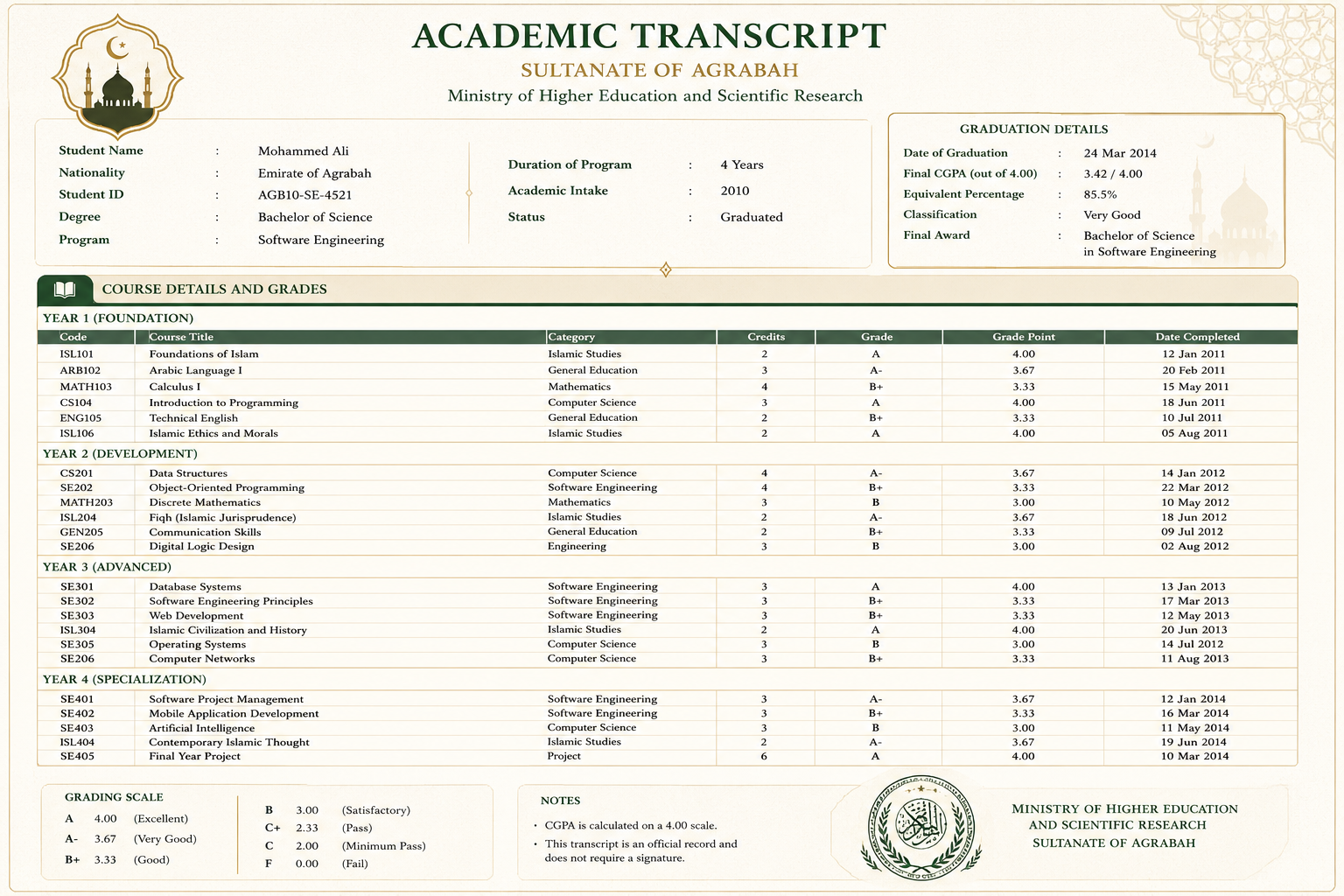
What is a prompt? The general concept
-
A prompt is the whole input that is given to an LLM, in order to elicit some desired output
- in the Chat Completion API, it is the list of messages sent in a request (system, user, assistant, …)
- the model sees nothing else: everything it needs to know must be in there
-
Prompt engineering is the practice of designing, testing, and refining prompts, so that the model’s responses become more accurate, consistent, and useful for the task at hand
- it is empirical: there is no theory telling in advance which prompt works best on which model
- hence, it is only meaningful when paired with some form of evaluation (more on this in the next lectures)
-
A prompt is commonly made of four (optional) elements (cf. Prompt Engineering Guide):
- instructions: the task to be performed, and how to perform it (e.g. “score this letter”)
- context: background information that may help the model (e.g. “you are assisting a PhD admission committee”)
- input data: the specific data to be processed (e.g. the text of the letter)
- output indicator: the format or type of the expected output (e.g. “answer in JSON, with fields …”)
Anatomy of a prompt: an intuitive example
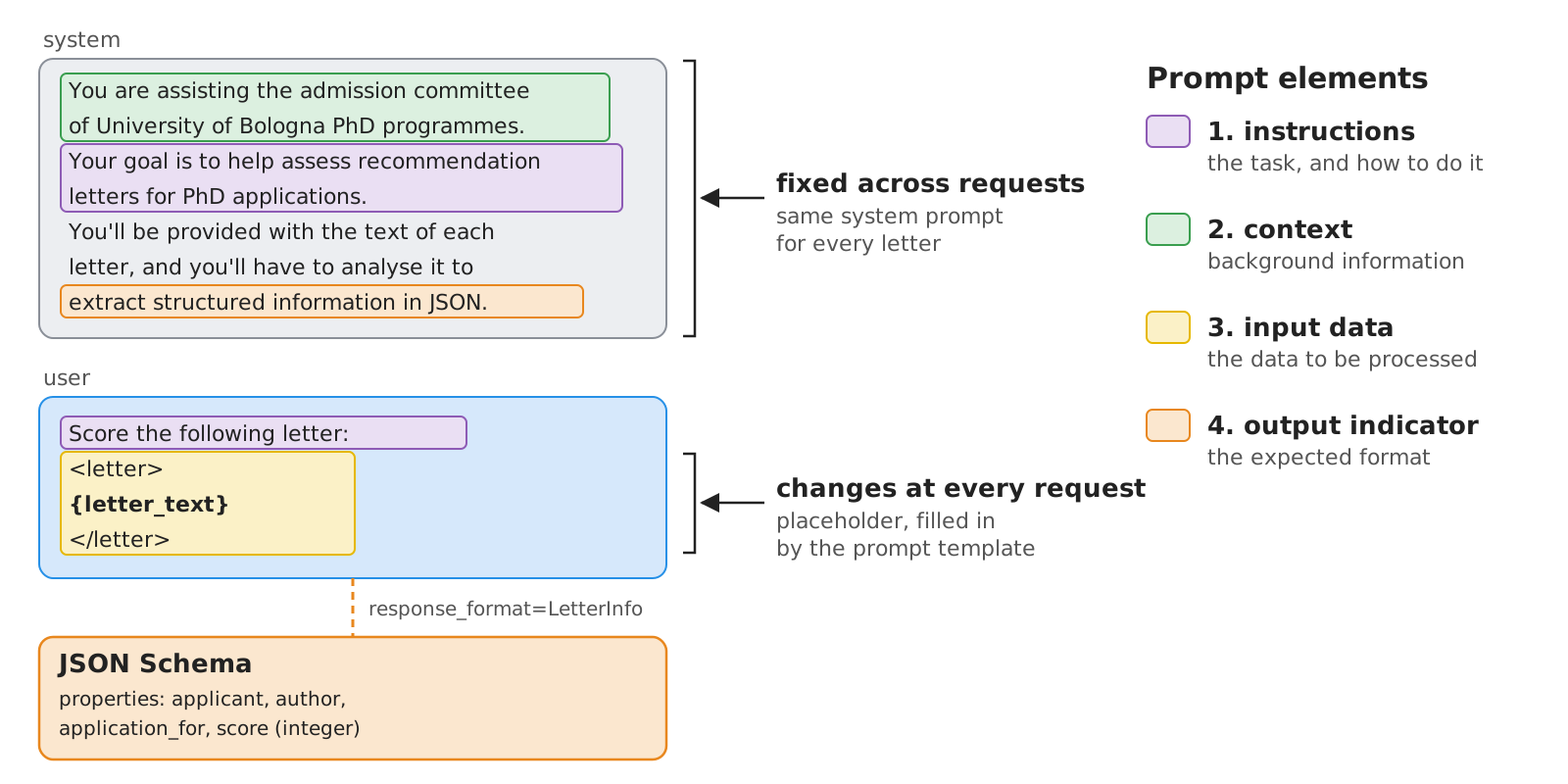
- The system prompt commonly contains the stable parts (context, general instructions, output format)
- The user prompt commonly contains the variable parts (input data, specific instructions)
- this separation makes prompts easy to templatize: fixed text + named placeholders filled at runtime
Prompt engineering best practices: the landscape
- Each provider publishes its own prompting guide, and most advice is shared across them:
| Practice | Rationale | Example |
|---|---|---|
| Be clear and specific | the model cannot read your mind | “summarise in 3 bullet points, max 15 words each” vs. “summarise” |
| Give a role / context | narrows down the space of plausible answers (personas add little accuracy, cf. Zheng et al., 2024) | “You are assisting the admission committee of …” |
| Use delimiters | separates instructions from data (and mitigates, not prevents, prompt injection) | <letter> ... </letter>, Markdown headings, triple quotes |
| Say what to do, not only what not to do | negative instructions are followed less reliably | “use plain words” vs. “don’t use jargon” |
| Provide examples | showing is more effective than telling | cf. few-shot prompting |
| Specify the output format | downstream code needs to parse the response | cf. structured outputs |
| Let the model think first | complex tasks benefit from intermediate steps | cf. chain-of-thought and reasoning models |
| Iterate and measure | prompts behave differently across models and versions | keep a set of test inputs with expected outputs |
- Guides also contain model-specific advice (e.g. Claude likes XML tags, reasoning models need less step-by-step guidance)
- prompts are not portable across models: re-test them whenever you switch model
Prompts are artifacts too
- In a product, prompts deserve the same care as code:
- stored in files (e.g. Markdown, or Jinja templates) under version control, rather than scattered across the code
- loaded at runtime, e.g.
ChatPromptTemplate.from_template(Path("prompts/scoring.md").read_text()) - tested at each change, like code (cf. validating generative software)
- Prompt registries add versioning, labels (e.g.
production), and links to evaluations and traces: - (in the snippets of this course, prompts stay inline, so that each file can be read on its own)
About Structured Output
TL;DR: forcing the model to produce output in a specific format (e.g. JSON matching a given schema) so that to bring unstructured input data (e.g. natural language) into structured form that can be easily processed by downstream applications (e.g. databases, APIs, etc.)
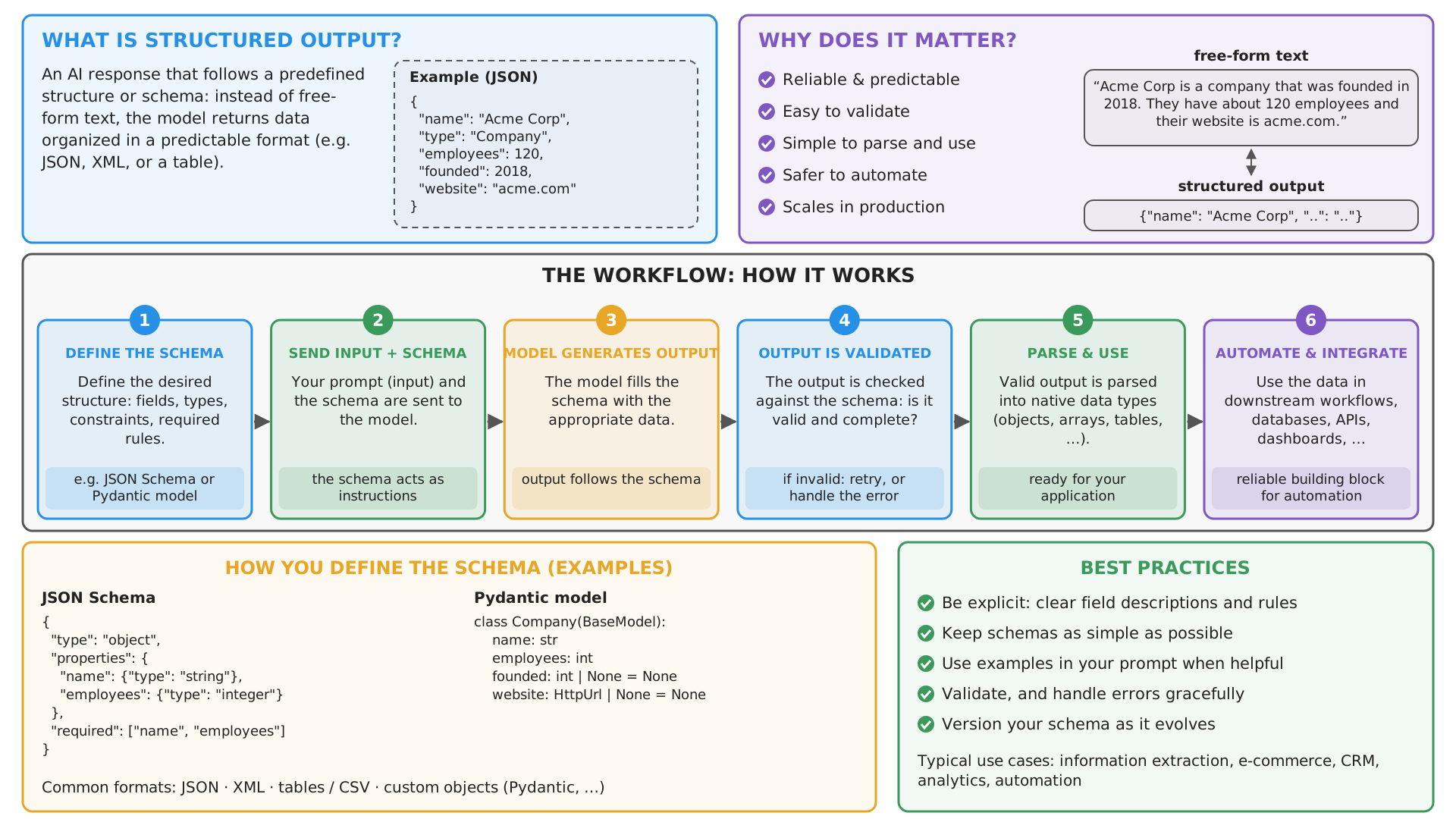
How to represent target structured format to the model?
-
In the prompt: as a natural language description (“a JSON object with fields name, age, email”), as an example (
{"name": "John Doe", "age": 30, "email": "john.doe@example.com"}), or as a formal schema (e.g. JSON Schema), possibly combined -
In strongly-typed programming languages (e.g. Java), client libraries may reverse-engineer the schema from the type definitions in the code, using reflection, or leverage serialization libraries such as Jackson
-
In Python, one can use libraries like
pydanticto define data models with validation logic, and then generate JSON Schemas from them- this is so common, that LLM-aaS Client Libraries (there including
openai) often have built-in support forpydanticmodels
- this is so common, that LLM-aaS Client Libraries (there including
Pydantic classes with documentation strings
-
pydanticdata models are Python classes extendingpydantic.BaseModel, with type annotations for the fields (also from the standard library, e.g.datetime,Optional), possibly nested -
To make the data model understandable to the LLM, one should add documentation strings (docstrings and
Field(description=...)), which end up in the generated JSON Schema asdescriptionfieldsfrom typing import Optional from pydantic import BaseModel, Field # <-- notice the import of Field for adding documentation strings from datetime import datetime class User(BaseModel): """Anagraphical and contact information about a user.""" name: str = Field(..., description="The user's full name") age: int = Field(..., description="The user's age in years") email: Optional[str] = Field(default=None, description="The user's email address") class Post(BaseModel): """A blog post created by a user.""" title: str = Field(..., description="The title of the post") content: str = Field(..., description="The content of the post") author: User = Field(..., description="The author of the post") created_at: datetime = Field(default_factory=datetime.now, description="The date and time when the post was created")Field(...): the...(Ellipsis) as first argument marks the field as required, whiledefault=ordefault_factory=(a function computing the default) make it optionalpydanticdata model $\approx$ data classes with validation and serialization logic: e.g.User(name="John Doe", age=30)(type-checked constructor),user.model_dump_json(),User.model_json_schema()
Pydantic classes with documentation strings (cont.)
For instance, User.model_json_schema() produces the following JSON Schema (formatted in YAML for better readability):
title: User
type: object
description: Anagraphical and contact information about a user.
properties:
  name: {title: Name, type: string, description: The user's full name}
  age: {title: Age, type: integer, description: The user's age in years}
  email:
    anyOf: [{type: string}, {type: 'null'}]
    default: null
    title: Email
    description: The user's email address
required: [name, age]
- OpenAI’s strict mode wants every field to be
required(and no defaults): client libraries (e.g.openai’s.parse(...)) rewrite the schema accordingly before sending it- hence, optional information is best modelled as
Optional[...]without default, i.e. the field must be present, but may benull(as in Example 1, below)
- hence, optional information is best modelled as
How is structured output enforced? (pt. 1)
From weakest to strongest guarantees:
-
Prompt-only: describe the format in the prompt, then parse (and validate) the response
- works with any model, yet the output may be malformed (missing fields, extra text, Markdown fences around JSON…)
-
JSON mode (e.g.
response_format={"type": "json_object"}): the output is guaranteed to be valid JSON, but not to match your schema -
Schema-constrained output (e.g.
response_format={"type": "json_schema", ..., "strict": true}): the output is guaranteed to match the JSON Schema- commonly implemented via constrained decoding: at each generation step, tokens that would violate the schema are masked out
- cf. Willard & Louf (2023), and libraries such as Outlines, llguidance, XGrammar
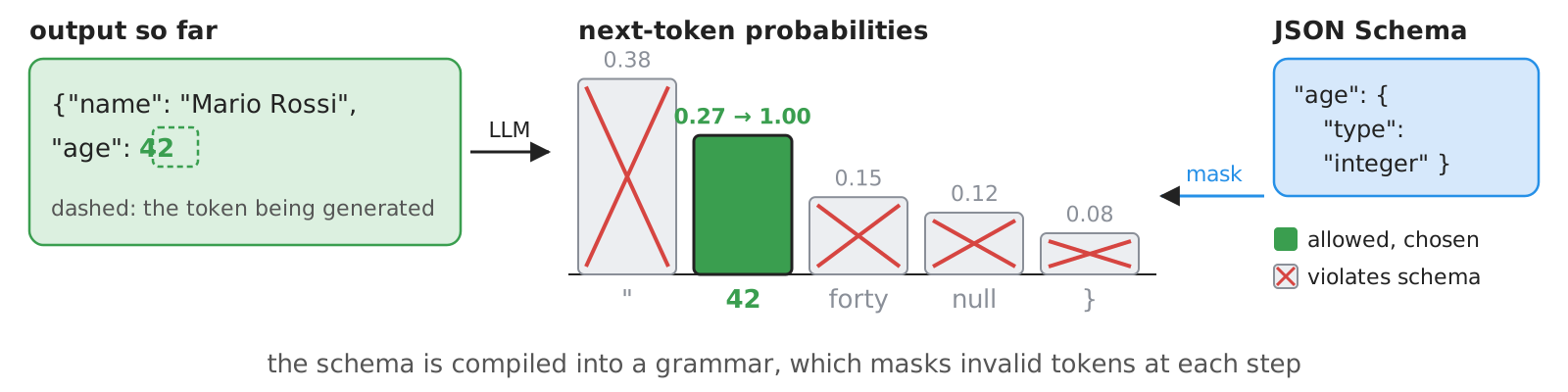
-
Tool-calling trick: declare a (fake) tool whose parameters are the target schema, and force the model to call it
- the tool-call arguments are the structured output (common before providers supported (3))
How is structured output enforced? (pt. 2)
| Provider / tool | How to request schema-constrained output | Docs |
|---|---|---|
| OpenAI (Chat Completion) | response_format={"type": "json_schema", "json_schema": {..., "strict": True}}, or client.chat.completions.parse(response_format=PydanticClass) |
link |
| OpenAI-compatible (e.g. OpenRouter) | same as OpenAI, if the underlying model supports it | link |
| Anthropic (Messages) | output_config={"format": {"type": "json_schema", "schema": ...}}, or strict tool use |
link |
| Google Gemini | JSON mime type + JSON Schema in the request configuration | link |
| Ollama (local) | format=<JSON Schema> in the request |
link |
| LangChain (any of the above) | llm.with_structured_output(PydanticClass) |
link |
- Same concept everywhere: a JSON Schema travels along with the request, and the response is (guaranteed to be) an instance of it
- Different syntax: parameter names and nesting differ across providers, and not all models support all options
- in Python, most client libraries accept
pydanticclasses directly, and convert them into JSON Schemas for you
- in Python, most client libraries accept
- No
json_schemasupport? Errors, or schema silently ignored: in LangChain, usemethod="function_calling"(tool-calling trick) or"json_mode"; on OpenRouter, setprovider.require_parameters=true
[BEWARE] the format is guaranteed to be correct, the content is not: always validate the values
Example 1: Structured Output with Pydantic Classes (pt. 1)
Goal: let’s extract structured information from the candidates’ presentation letters
- In particular:
- information about the applicant (name, strengths, weaknesses, etc.), to see whether the letter is actually positive
- information about the authors of the letter (e.g. name, position, relationship with the applicant, etc.), to see whether the letter is actually credible
- give a reproducible and grounded recipe for scoring the letter based on these aspects
-
Let’s import
openaiand initialize the client as usual:import os from openai import OpenAI base_url = os.environ.get("OPENAI_BASE_URL", "https://openrouter.ai/api/v1/") api_key = os.environ.get("OPENAI_API_KEY") or input(f"Enter your API key for {base_url}: ") model = os.environ.get("OPENAI_MODEL", "nvidia/nemotron-3-super-120b-a12b:free") client = OpenAI(base_url=base_url, api_key=api_key) -
Let’s design a system prompt to contain general instructions for the model
general_instructions = """
You are assisting the admission committee of University of Bologna PhD programmes.
Your goal is to help assess recommendation letters for PhD applications.
You'll be provided with the text of each letter,
and you'll have to analyse it to extract structured information in JSON.
"""
Example 1: Structured Output with Pydantic Classes (pt. 2)
-
Let’s define
pydanticclasses to represent the target format, with documentation strings to complement the specification-
Imports:
from typing import Optional from pydantic import BaseModel, Field -
A class for the applicant’s information:
class ApplicantInfo(BaseModel): """Structured information about the applicant, extracted from the letter.""" name: str = Field(description="Full name of the applicant, first name first, family name last.") degree: Optional[str] = Field(description="Degree obtained by the applicant before the application, according to the letter.") alma_mater: Optional[str] = Field(description="University where the applicant obtained their degree, according to the letter.") attended: list[str] = Field(description="List of courses or teachings the applicant has attended, as mentioned in the letter.") skills: list[str] = Field(description="List of skills possessed by the applicant, as mentioned in the letter.") strengths: list[str] = Field(description="List of strengths identified for the applicant, as mentioned in the letter, except skills.") weaknesses: list[str] = Field(description="List of weaknesses identified for the applicant, as mentioned in the letter.") -
A class for the author’s information:
class AuthorInfo(BaseModel): """Structured information about the author of the letter, extracted from the letter.""" name: str = Field(description="Full name of the author, first name first, family name last.") affiliation: str = Field(description="Affiliation of the author, according to the letter.") position: Optional[str] = Field(description="Position of the author, according to the letter, in their institution.") seniority: Optional[int] = Field(description="Seniority of the author: 1=researcher or lecturer, 2=assistant professor, 3=associate professor, 4=full professor, 0=other. " \ "Scale similarly in case of non-academic positions, e.g., 1=entry-level, 2=mid-level, 3=senior, 4=executive.") email: str = Field(description="Email of the author, according to the letter.") nationality: Optional[str] = Field(description="Nationality of the author, according to the letter.") relationship_with_applicant: Optional[str] = Field(description="Relationship of the author with the applicant, according to the letter.") -
A class for the overall scoring of the letter, including the extracted information and the final score:
class LetterInfo(BaseModel): applicant: ApplicantInfo = Field(description="Information about the person the letter is about, i.e., the one applying for the PhD programme.") author: AuthorInfo = Field(description="Information about the person who wrote the letter, i.e., the one recommending the applicant for the PhD programme.") application_for: str = Field(description="The PhD programme for which the applicant is applying.") score: int = Field(description=f"The score assigned to the letter according to the following rules.{scoring_instructions}")- notice that instructions for scoring are contained in another string
-
Example 1: Structured Output with Pydantic Classes (pt. 3)
-
Instructions for scoring can be provided as well in natural language, yet better to be precise and give the LLM a “recipe” for scoring
scoring_instructions = """ Maximum score is +5, minimum score is 0. Start by maximum and decrease by 1 for each issue among the following: - -1 per each lacking non-optional field, - not clear how the author knows the applicant, - vague relationship between the author and the applicant: no storytelling about the applicant, - skills mentioned in the letter are very generic and not supported by concrete examples, - no strengths mentioned in the letter or very generic ones, not supported by concrete examples, - author mentions weaknesses about the applicant explicitly or implicitly, - letter is not tailored for a specific PhD programme. """ -
With these ingredients in mind, the automatic scoring logic is as simple as a single request–response interaction with the LLM:
def score_letter(letter_text: str, client: OpenAI = client, model: str = model) -> LetterInfo:
    # .parse(...) passes the JSON Schema of LetterInfo to the model, and parses the answer back into a LetterInfo
    response = client.chat.completions.parse(
        model=model,
        messages=[
            dict(role="system", content=general_instructions),
            dict(role="user", content=f"Score the following letter:\n\n<letter>\n{letter_text}\n</letter>"),
        ],
        response_format=LetterInfo,
    )
    message = response.choices[0].message
    if message.refusal:  # the model may refuse to answer, e.g. for safety reasons
        raise RuntimeError(f"Model refused: {message.refusal}")
    return message.parsed
notice that:
- function
client.chat.completions.parse(...)is called in place of.create(...)- to automatically parse the model’s response into an instance of the
LetterInfo
- to automatically parse the model’s response into an instance of the
- the
response_formatparameter is set to a reference to theLetterInfoclassopenaiwill automatically generate the corresponding JSON Schema from the class definition, and include it in the request
message.parsedis theLetterInfoinstance, unless the model refuses to answer (e.g. for safety reasons): thenmessage.refusalholds its explanation
- function
Example 1: Structured Output with Pydantic Classes (pt. 4)
-
Full code here
-
At this point, the logic of the program is trivial (load letter file $\rightarrow$ call
score_letter(...)$\rightarrow$ print the result):if __name__ == "__main__": import sys import data print(f"Using model: {model}") letter_path = sys.argv[1] if len(sys.argv) > 1 else input("Enter the letter to score (candidate's ID or path): ") letter_path = data.find_letter(letter_path) if not letter_path.is_file(): print(f"File {letter_path} is not a file.") sys.exit(1) letter_text = letter_path.read_text() letter_info = score_letter(letter_text) print(letter_info.model_dump_json(indent=2)) # a LetterInfo object, printed as JSONdata.find_letter(...)(from thedatapackage oflab-snippets): thePathof a letter, given either a candidate’s ID (e.g.mario-rossi) or a file path
Example 1: Structured Output with Pydantic Classes (pt. 4, cont.)
- Possible results below:
applicant:
  name: Mario Rossi
  degree: Master's degree in Computer Science and Engineering
  alma_mater:
  attended: [ "Machine Learning and Data Mining" ]
  skills:
  - algorithms
  - probability
  - statistics
  - machine learning
  - database systems
  - programming
  - experimental evaluation
  - designing reproducible computational experiments
  strengths:
  - strong analytical ability
  - intellectual discipline
  - capacity to connect theoretical material with implementation
  - independence
  - reliability in deadlines
  - clear communication
  - constructive and precise in group settings
  - methodical and capable of sustained work on open-ended problems
  weaknesses: []
author:
  name: Alessandro Bianchi
  affiliation: Department of Computer Science and Engineering, University of Bologna
  position: Associate Professor of Computer Science
  seniority: 3
  email: alessandro.bianchi@example.edu
  nationality:
  relationship_with_applicant: Course instructor and thesis supervisor
application_for: PhD Programme in Data Science
score: 5
applicant:
  name: Jean Dupont
  degree:
  alma_mater: Université de Lyon
  attended:
  - Apprentissage automatique
  - Vision par ordinateur
  skills:
  - Machine learning
  - Computer vision
  - Supervised learning
  - Classification methods
  - Dimensionality reduction
  - Support Vector Machines (SVM)
  - Data analysis
  - Programming
  strengths:
  - Technical competence in AI/ML
  - Ability to implement algorithms and follow protocols
  - Dependable and focused in structured settings
  - Receptive to feedback and able to work with explicit milestones
  weaknesses:
  - Prefers well-defined problems and structured supervision; less comfortable defining
    problems independently
  - Written work sometimes descriptive rather than analytical
  - May not quickly identify deeper limitations or broader implications
author:
  name: Claire Moreau
  affiliation: Université de Lyon, Département d’Informatique
  position: Maîtresse de conférences en informatique
  seniority: 1
  email: claire.moreau@example.fr
  nationality:
  relationship_with_applicant: Course instructor for Jean Dupont’s Master’s courses
    (Apprentissage automatique) and his primary contact during the research-oriented
    module Vision par ordinateur
application_for: PhD Programme in Artificial Intelligence
score: 4
applicant:
  name: Mohammed Ali
  degree:
  alma_mater:
  attended:
  - computing
  - software development
  - information systems
  - programming
  - software engineering
  - databases
  - computer networks
  - Islamic studies
  - ethics
  - communication
  - social responsibility
  skills:
  - programming
  - software engineering
  - databases
  - computer networks
  strengths:
  - polite
  - serious
  - disciplined
  - ability to follow academic instructions
  weaknesses: []
author:
  name: Kareem Al-Haddad
  affiliation: Department of Computer Science, University of Amman
  position: Associate Professor
  seniority: 3
  email: k.alhaddad@example.edu.jo
  nationality:
  relationship_with_applicant: course instructor in Software Engineering programme
application_for: PhD Programme in Cyber Security
score: 4
Example 1: Project Structure
Files of this example, in the lab-snippets repository (cf. how to set it up, and run snippets):
lab-snippets/
├── data/
│   ├── letter-jean-dupont.txt            # inputs (running example)
│   ├── letter-mario-rossi.txt
│   ├── letter-mohammed-ali.txt
│   └── __init__.py                       # helpers to locate data files
├── snippets/
│   └── lecture_prompting/
│       └── example1/
│           └── letter_scoring_openai.py  # the letter-scoring system
└── pyproject.toml                        # dependencies of all snippets
poetry run python -m snippets -l prompting -e 1 data/letter-mario-rossi.txt # or just: mario-rossi
- set the environment variables
OPENAI_API_KEY(and, optionally,OPENAI_BASE_URL,OPENAI_MODEL), cf. Free Access to LLMs
About LangChain
-
LangChain is a third-party, open-source framework for building LLM-based applications (docs)
- available in Python and JavaScript/TypeScript
- by the same company: LangGraph (workflows, in later lectures), and LangSmith (observability and evaluation)
-
It provides a uniform meta-model on top of many providers’ APIs:
- chat models (e.g.
ChatOpenAI,ChatAnthropic,ChatGoogleGenerativeAI,ChatOllama): one class per provider, same interface- each one is shipped in a separate package (e.g.
pip install langchain-openai)
- each one is shipped in a separate package (e.g.
- messages (
SystemMessage,HumanMessage,AIMessage, …), prompt templates, output parsers, tools, … - all of them are runnables: objects with
.invoke(input),.batch(inputs),.stream(input)(andasyncvariants), which can be composed with the|operator
- chat models (e.g.
-
Why bother?
- switching provider = changing one line (the chat model class), not rewriting the program
- higher-level abstractions (templates, structured output, tools, agents, RAG) come for free
-
Why not?
- one more layer of indirection (and of dependencies, and of breaking changes)
- provider-specific features may lag behind, or be available only via “escape hatches” (e.g.
extra_body)
Example 1 (bis): the same Letter Scoring System with LangChain (pt. 1)
-
Let’s import LangChain’s chat model for OpenAI-compatible APIs, and initialize it, reusing the configuration, the instructions, and the
pydanticclasses of Example 1 (i.e. the same environment variables):from langchain_openai import ChatOpenAI from langchain_core.prompts import ChatPromptTemplate # same configuration, instructions, and output schema (Pydantic classes) as in Example 1 from snippets.lecture_prompting.example1.letter_scoring_openai import base_url, api_key, model, general_instructions, \ ApplicantInfo, AuthorInfo, LetterInfo llm = ChatOpenAI(base_url=base_url, api_key=api_key, model=model)ChatOpenAI(packagelangchain_openai) wraps theopenaiclient: samebase_urlandapi_key, but themodelis set once, at construction time
-
Let’s define the prompt as a template, with a named placeholder (
{letter_text}) for the input data:# a prompt template: messages with placeholders (e.g. {letter_text}), filled in at invocation time prompt = ChatPromptTemplate.from_messages([ ("system", general_instructions), ("user", "Score the following letter:\n\n<letter>\n{letter_text}\n</letter>"), ])ChatPromptTemplate.from_messagesaccepts a list of(role, template)pairsprompt.invoke({"letter_text": "..."})would produce the list of messages to be sent to the model
-
pydanticclasses and scoring instructions are imported from the OpenAI version, as they do not depend on the client library (full code here)
Example 1 (bis): the same Letter Scoring System with LangChain (pt. 2)
-
The scoring logic is a chain: prompt template $\rightarrow$ chat model constrained to produce
LetterInfoinstances:# a chain: the filled-in prompt goes to the LLM, whose answer is parsed into a LetterInfo scoring_chain = prompt | llm.with_structured_output(LetterInfo) def score_letter(letter_text: str) -> LetterInfo: return scoring_chain.invoke({"letter_text": letter_text}) # fills the {letter_text} placeholdernotice that:
llm.with_structured_output(LetterInfo)returns a new runnable, whose output is an instance ofLetterInfo- the
methodargument selects how structure is enforced:"json_schema"(default for OpenAI),"function_calling"(tool-calling trick), or"json_mode" include_raw=Truereturns the raw response too (useful to inspect token usage, or parsing errors)
- the
prompt | ...creates a sequence: the output of the template (messages) is the input of the modelscoring_chain.invoke({...})runs the whole chain,scoring_chain.batch([{...}, {...}])runs it on many inputs, in parallel
-
The
mainpart of the program is unchanged:poetry run python -m snippets -l prompting -e 1bis data/letter-mario-rossi.txt
Example 1 (bis): Project Structure
Files of this example, in the lab-snippets repository (cf. how to set it up, and run snippets):
lab-snippets/
├── data/
│   ├── letter-jean-dupont.txt               # inputs (running example)
│   ├── letter-mario-rossi.txt
│   ├── letter-mohammed-ali.txt
│   └── __init__.py                          # helpers to locate data files
├── snippets/
│   └── lecture_prompting/
│       └── example1bis/
│           └── letter_scoring_langchain.py  # the letter-scoring system
└── pyproject.toml # dependencies of all snippets- set the environment variables
OPENAI_API_KEY(and, optionally,OPENAI_BASE_URL,OPENAI_MODEL), cf. Free Access to LLMs
OpenAI client vs. LangChain: analogies and differences
| Aspect | openai client |
LangChain |
|---|---|---|
| Model access | OpenAI(base_url, api_key) + model= at each request |
ChatOpenAI(base_url, api_key, model), once |
| Prompt | list of dict(role=..., content=...), built with f-strings |
ChatPromptTemplate with named placeholders |
| Structured output | client.chat.completions.parse(response_format=Class) |
llm.with_structured_output(Class) |
| Result | response.choices[0].message.parsed (check .refusal!) |
the Class instance, directly |
| Composition | plain Python functions | runnables composed with | |
| Batching / parallelism | up to you (e.g. asyncio) |
.batch(...), .abatch(...) |
| Other providers | only OpenAI-compatible APIs | any provider with a LangChain integration |
| Access to provider-specific features | immediate | may require extra_body=... or model_kwargs=... |
- The concepts (messages, roles, JSON Schema,
pydanticclasses) are the same: only the syntax changes - From now on, we’ll stick to LangChain
Exercise 1: Improving Letter Scoring with (even more) Structured Output
Problem: the scoring recipe provided to the model is still quite vague and unstructured, which may lead to inconsistent and non-reproducible scores. Even when good, scores are not explainable, as the reasoning behind them is not made explicit.
Code: put your solution in
snippets/lecture_prompting/exercise1/oflab-snippets, and run it viapoetry run python -m snippets -l prompting -x 1
TO-DO List
- start from the LangChain version of the letter-scoring system
- let’s turn the scoring recipe into a checklist of criteria
- let’s have a Pydantic class with as many boolean fields as the criteria in the checklist
- let’s ask the LLM to set the boolean fields by analysing the input letter
- let’s write down the algorithm to compute the final score based on the boolean fields, as a function in the Pydantic class
- the scoring logic is now reproducible and explainable
- the hallucination margin is reduced, as the model is not asked to directly produce a score, but rather to fill in the boolean fields based on the content of the letter, which is an easier task
Solution: a walkthrough follows in the next (vertical) column — try on your own first!
Exercise 1: Improving Letter Scoring with (even more) Structured Output — Solution
⚠️ Spoiler alert: the walkthrough of the solution of Exercise 1 is about to start
- Do not proceed until you have attempted the exercise on your own
- press → to skip the walkthrough, ↓ to see it
- The solution’s code is on the
masterbranch oflab-snippets- you are supposed to work on the
exercisesbranch, which only contains placeholders
- you are supposed to work on the
Exercise 1 — Solution: the checklist
Steps 2–3: the scoring recipe becomes a checklist, i.e. a Pydantic class with one boolean field per criterion
# step 2-3: the scoring recipe of Example 1 bis, turned into a checklist, i.e. one boolean field per criterion
# (phrased so that True is always GOOD, and descriptions tell the LLM exactly what to check)
class Checklist(BaseModel):
    """Criteria for assessing a recommendation letter: set each one to true only if the letter clearly satisfies it."""

    clear_acquaintance: bool = Field(description="The letter clearly states how, where, and for how long the author knows the applicant.")
    storytelling: bool = Field(description="The letter tells concrete stories or episodes about the applicant, rather than just listing adjectives.")
    concrete_skills: bool = Field(description="The skills attributed to the applicant are specific and supported by concrete examples.")
    concrete_strengths: bool = Field(description="The letter mentions strengths of the applicant (other than skills), supported by concrete examples.")
    no_weaknesses: bool = Field(description="The author does NOT mention weaknesses of the applicant, neither explicitly nor implicitly (e.g. 'needs supervision').")
    tailored: bool = Field(description="The letter is tailored for the specific PhD programme the applicant is applying for.")
- Criteria are phrased so that
Trueis always good: the score is then just a count of failures- mixing polarities (e.g. a
has_weaknessesfield) is an easy source of bugs in the scoring code
- mixing polarities (e.g. a
- Each
descriptiontells the LLM exactly what to check: it ends up in the JSON Schema, hence in the prompt - Booleans are an easier task than “give a score from 0 to 5”: less room for arbitrariness
Exercise 1 — Solution: the output schema, and the chain
Step 4: the LLM fills in the checklist, but no longer outputs the score
class LetterInfo(BaseModel):
    applicant: ApplicantInfo = Field(description="Information about the person the letter is about, i.e., the one applying for the PhD programme.")
    author: AuthorInfo = Field(description="Information about the person who wrote the letter, i.e., the one recommending the applicant for the PhD programme.")
    application_for: str = Field(description="The PhD programme for which the applicant is applying.")
    checklist: Checklist = Field(description="Assessment of the letter, criterion by criterion.")
    # no `score` field here: the LLM does not compute it anymore!
scoring_chain = prompt | llm.with_structured_output(LetterInfo)  # step 4: the LLM fills in the checklist

def score_letter(letter_text: str) -> LetterInfo:
    return scoring_chain.invoke({"letter_text": letter_text})
- LLM, prompt,
ApplicantInfo, andAuthorInfoare imported from Example 1 (bis): only the scoring changes - The checklist is a nested model: structured output handles nested schemas out of the box
- The chain is the same
prompt | llm.with_structured_output(...)as before: only the target class differs
Exercise 1 — Solution: the scoring algorithm
Step 5: the score is computed by code, from the checklist, as
@propertys of the Pydantic class
    # step 5: the scoring algorithm, as code (a property: computed from the other fields, never generated by the LLM)
    @property
    def missing_fields(self) -> list[str]:
        """The non-optional fields which the letter does not provide (e.g. empty strings or lists)."""
        required = {
            "applicant.name": self.applicant.name, "applicant.skills": self.applicant.skills, "applicant.strengths": self.applicant.strengths,
            "author.name": self.author.name, "author.affiliation": self.author.affiliation, "author.email": self.author.email,
            "application_for": self.application_for,
        }
        return [name for name, value in required.items() if not value]

    @property
    def penalties(self) -> list[str]:
        """Why points were lost: the explanation of the score."""
        failed = [name for name, satisfied in self.checklist.model_dump().items() if not satisfied]
        return failed + [f"missing {name}" for name in self.missing_fields]

    @property
    def score(self) -> int:
        """Starts from the maximum (5), and decreases by 1 per penalty, down to the minimum (0)."""
        return max(0, 5 - len(self.penalties))
- Properties are not part of the JSON Schema: the LLM never sees (nor generates) them
model_dump()turns a Pydantic object into adict(field name $\rightarrow$ value): here, to iterate over the criteriapenaltiesis the explanation of the score: which criteria failed, which fields are missing- Same input checklist $\Rightarrow$ same score: reproducible
- the remaining variability is in the checklist, which can be inspected (and corrected) by a human
Exercise 1 — Solution: Project Structure
Files of this solution, in the lab-snippets repository (branch master):
lab-snippets/
├── data/
│   ├── letter-jean-dupont.txt               # inputs (running example)
│   ├── letter-mario-rossi.txt
│   ├── letter-mohammed-ali.txt
│   └── __init__.py                          # helpers to locate data files
├── snippets/
│   └── lecture_prompting/
│       ├── example1bis/
│       │   └── letter_scoring_langchain.py  # LLM, prompt, info classes (reused)
│       └── exercise1/
│           └── letter_scoring_checklist.py  # the checklist-based scoring
└── pyproject.toml                           # dependencies of all snippets
poetry run python -m snippets -l prompting -x 1 mario-rossi # or a path, e.g. data/letter-mario-rossi.txt
- set the environment variables
OPENAI_API_KEY(and, optionally,OPENAI_BASE_URL,OPENAI_MODEL), cf. Free Access to LLMs - try all three letters: are the penalties consistent with your own reading of them?
Prompting techniques: the general concept
| Technique | Idea | Reference |
|---|---|---|
| Zero-shot | only instructions, no examples | Radford et al. (2019) |
| Few-shot (a.k.a. in-context learning) | instructions + a few solved examples (input $\rightarrow$ expected output) | Brown et al. (2020) |
| Chain-of-Thought (CoT) | ask the model to write intermediate reasoning steps before the answer | Wei et al. (2022) |
| Zero-shot CoT | just add “Let’s think step by step” | Kojima et al. (2022) |
| Self-consistency | sample many answers (with temperature > 0), then take a majority vote | Wang et al. (2023) |
| Prompt chaining | split a complex task into a sequence of simpler prompts, each feeding the next | Wu et al. (2022) |
- More techniques exist (e.g. tree of thoughts, ReAct, self-refine): see The Prompt Report for a taxonomy
- ReAct (reasoning + acting) will be the basis of agents, two lectures ahead
- Folk prompt patterns (role playing, emotion prompting, …) have weak or inconsistent evidence (cf. EmotionPrompt, Li et al., 2023 vs. The Prompt Report): measure, don’t trust
- Techniques combine: e.g. few-shot + CoT + self-consistency
Prompting techniques: an intuitive example
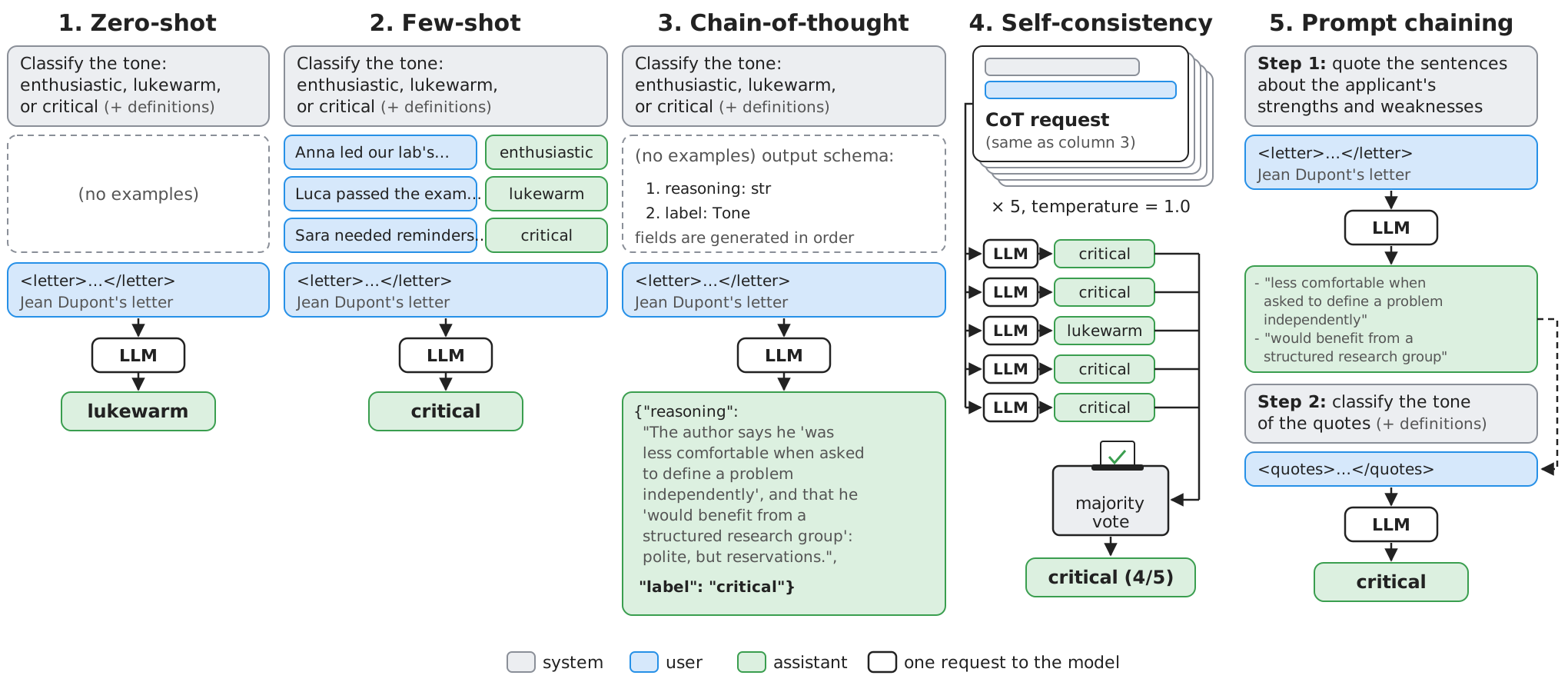
Prompting techniques in LangChain: the technological landscape
- Techniques are about the prompt, hence they’re mostly provider-agnostic: any chat model can be used
- What frameworks offer is support for building such prompts, and for running them many times:
| Technique | Raw client library | LangChain |
|---|---|---|
| Zero-shot | list of messages | ChatPromptTemplate.from_messages([...]) |
| Few-shot | append example (user, assistant) pairs by hand | FewShotChatMessagePromptTemplate, optionally with an example selector (e.g. by semantic similarity) |
| CoT | add “think step by step”, or a reasoning field in the output schema |
same, with with_structured_output(...) |
| Self-consistency | $N$ requests (e.g. via asyncio), then vote |
chain.batch([input] * N), then vote |
| Prompt chaining | call the model, parse, build next prompt, call again | compose runnables with | (e.g. prompt1 | llm | parser | prompt2 | llm) |
- Docs: prompt templates, runnables
- Other frameworks follow the same ideas (e.g. DSPy goes further, and optimises prompts and examples automatically)
Example 2: Classifying Letters’ Tone, with Several Techniques (pt. 1)
Goal: classify the tone of each presentation letter as
enthusiastic,lukewarm, orcritical, and compare techniques
-
Let’s initialize the chat model (notice
temperature=1.0: we want variability, for self-consistency):base_url = os.environ.get("OPENAI_BASE_URL", "https://openrouter.ai/api/v1/") api_key = os.environ.get("OPENAI_API_KEY") or input(f"Enter your API key for {base_url}: ") model = os.environ.get("OPENAI_MODEL", "nvidia/nemotron-3-super-120b-a12b:free") llm = ChatOpenAI(base_url=base_url, api_key=api_key, model=model, temperature=1.0) # some randomness, for self-consistency -
The system prompt defines the labels; the output is constrained to them via a
Literaltype:Tone = Literal["enthusiastic", "lukewarm", "critical"] # the only admissible labels system = ("system", """You classify the tone of recommendation letters for PhD applications. Use exactly one label among: enthusiastic, lukewarm, critical. - enthusiastic: strong, specific, and unreserved support - lukewarm: positive, but generic or shallow, with little evidence - critical: explicit or implicit reservations about the applicant""") user = ("user", "<letter>\n{letter}\n</letter>") # 1. zero-shot: instructions only zero_shot = ChatPromptTemplate.from_messages([system, user])Literal[...](fromtyping): a type admitting only the listed values, which becomes anenumin the JSON Schema- the zero-shot prompt is just system instructions + user input
Example 2: Classifying Letters’ Tone, with Several Techniques (pt. 2)
-
The few-shot prompt adds solved examples, rendered as past turns of the conversation (user asks, assistant answers):
# 2. few-shot: instructions + solved examples, rendered as past conversation turns examples = [ {"letter": "Anna led our lab's move to Rust, and her thesis on lock-free queues became a paper at a top venue. " "She is the best student I supervised in ten years.", "label": "enthusiastic"}, {"letter": "Luca attended my course on distributed systems and passed the exam. " "He is a hard-working and motivated student, and I recommend him.", "label": "lukewarm"}, {"letter": "Sara is smart, although she sometimes needed reminders to meet deadlines. " "With proper supervision, she could do well in a PhD.", "label": "critical"}, ] few_shot = ChatPromptTemplate.from_messages([ system, FewShotChatMessagePromptTemplate( examples=examples, example_prompt=ChatPromptTemplate.from_messages([user, ("ai", "{label}")]), ), user, ])FewShotChatMessagePromptTemplatefillsexample_promptwith each dict inexamples, producing a (user,ai) message pair per example ("ai"is LangChain’s name for theassistantrole)- examples should be diverse (one per label, at least), short, and representative of real inputs
- the format and the label distribution of examples matter at least as much as their correctness (cf. Min et al. (2022))
Example 2: Classifying Letters’ Tone, with Several Techniques (pt. 3)
-
Chain-of-thought via structured output: a
reasoningfield is placed before thelabelfield:class ToneOnly(BaseModel): label: Tone = Field(description="The tone of the letter") # 3. chain-of-thought: the model must write its reasoning *before* the label (fields are generated in order) class ToneWithReasoning(BaseModel): reasoning: str = Field(description="Step by step: quote the key sentences of the letter, and discuss what they reveal about the author's opinion of the applicant") label: Tone = Field(description="The tone of the letter, decided according to the reasoning above") # one chain per technique: prompt template | LLM with structured output chains = { "zero-shot": zero_shot | llm.with_structured_output(ToneOnly), "few-shot": few_shot | llm.with_structured_output(ToneOnly), "cot": zero_shot | llm.with_structured_output(ToneWithReasoning), }- models generate JSON fields in order: the label is produced after (and conditioned on) the reasoning
- putting
reasoningafterlabelwould make it a mere post-hoc justification
- putting
- tight format constraints may hinder reasoning (cf. Tam et al. (2024)): leaving free-text room for reasoning helps
- caveat: the default model of these snippets is a reasoning model, which already “thinks” before answering: explicit CoT is then partly redundant (and costs more tokens); it pays off on non-reasoning models
- models generate JSON fields in order: the label is produced after (and conditioned on) the reasoning
Example 2: Classifying Letters’ Tone, with Several Techniques (pt. 4)
-
Self-consistency: run the same chain $N$ times, in parallel, and take the majority vote:
# 4. self-consistency: sample several answers (in parallel), then take a majority vote def classify(letter: str, technique: str, samples: int = 1) -> tuple[Tone, Counter]: answers = chains[technique].batch([{"letter": letter}] * samples) votes = Counter(answer.label for answer in answers) return votes.most_common(1)[0][0], votesCounter(fromcollections) counts the occurrences of each label;.most_common(1)[0][0]is the most voted one
-
Let’s try it (full code here):
poetry run python -m snippets -l prompting -e 2 zero-shot data/letter-jean-dupont.txt poetry run python -m snippets -l prompting -e 2 few-shot data/letter-jean-dupont.txt poetry run python -m snippets -l prompting -e 2 cot data/letter-jean-dupont.txt 5 # CoT + self-consistency, 5 samples- the script also prints the prompt template, so you can see what each technique actually sends
- try with the other letters, and with different models: which technique makes the answers most stable?
Example 2: Project Structure
Files of this example, in the lab-snippets repository (cf. how to set it up, and run snippets):
lab-snippets/
├── data/
│   ├── letter-jean-dupont.txt   # inputs (running example)
│   ├── letter-mario-rossi.txt
│   ├── letter-mohammed-ali.txt
│   └── __init__.py              # helpers to locate data files
├── snippets/
│   └── lecture_prompting/
│       └── example2/
│           └── letter_tone.py   # tone classification
└── pyproject.toml # dependencies of all snippets- set the environment variables
OPENAI_API_KEY(and, optionally,OPENAI_BASE_URL,OPENAI_MODEL), cf. Free Access to LLMs
Prompting techniques: trade-offs
| Technique | Extra tokens per request | Extra requests | Best for | Watch out for |
|---|---|---|---|---|
| Zero-shot | none | none | simple, well-specified tasks; strong models | ambiguous label definitions |
| Few-shot | examples (input side) | none | tasks where the format or the borderline cases are hard to describe | biased or unrepresentative examples |
| CoT | reasoning (output side, pricier) | none | multi-step tasks (maths, logic, multi-criteria judgments) | longer latency; reasoning may be unfaithful |
| Self-consistency | $\times N$ | $N - 1$ | tasks with a single correct answer, when reliability matters | cost; open-ended answers cannot be voted |
| Prompt chaining | depends | one per step | complex tasks with separable steps | error propagation across steps |
- Output tokens are commonly more expensive than input ones (cf. pricing)
- Always measure: on strong or reasoning models, some techniques (e.g. CoT prompting) bring little benefit, or even harm (cf. Sprague et al. (2024))
Reasoning models: the general concept
-
Reasoning models (a.k.a. thinking models) are LLMs trained to produce a (possibly long) chain of thought before the final answer, without being asked to
- i.e. CoT is built into the model, via reinforcement learning on tasks with verifiable answers (maths, code, logic)
- e.g. OpenAI’s o-series and GPT-5+, DeepSeek-R1, Claude with extended/adaptive thinking, Gemini “thinking” models, Qwen3,
gpt-oss
-
The chain of thought is made of reasoning tokens:
- they are generated (hence billed, as output tokens) and they consume the context window
- they may be hidden, summarised, or returned, depending on the provider
- they trade latency and cost for quality on hard tasks (“test-time compute”)
-
Most APIs let you control how much the model thinks, via a reasoning effort level (e.g.
low/medium/high), or a token budget
Reasoning models: an intuitive example
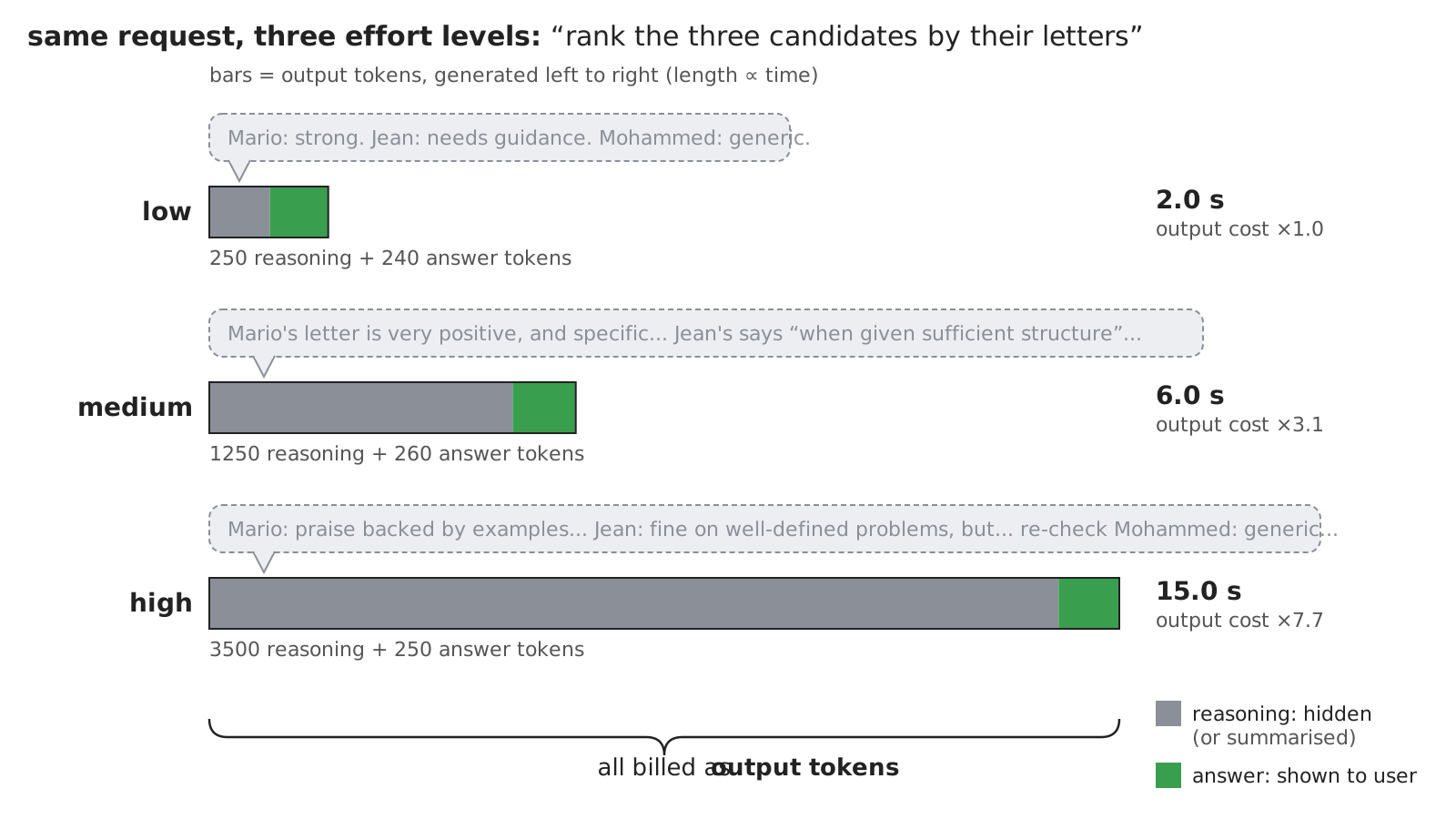
Reasoning models: the technological landscape
| Provider | How to control reasoning | Where reasoning tokens are counted | Docs |
|---|---|---|---|
| OpenAI | reasoning_effort (Chat Completion), reasoning={"effort": ...} (Responses) |
usage.completion_tokens_details.reasoning_tokens |
link |
| Anthropic | output_config={"effort": ...}; thinking={...} to enable/disable thinking, or set a budget (older models) |
usage.output_tokens (thinking included) |
link |
| Google Gemini | thinking_level (Gemini 3+), thinking_budget (Gemini 2.5) |
usage_metadata.thoughts_token_count |
link |
| OpenRouter | unified reasoning={"effort": ...} or reasoning={"max_tokens": ...}, mapped onto each provider |
usage.completion_tokens_details.reasoning_tokens |
link |
| Ollama (local) | think=True / False (or a level, for some models) |
— | link |
| LangChain | provider-specific arguments (e.g. ChatOpenAI(reasoning_effort=...)), or extra_body={...} |
response.usage_metadata["output_token_details"]["reasoning"] |
link |
- Same concept (effort levels or budgets), different syntax, and different levels per model (e.g.
minimal,none,xhigh,max) - Non-reasoning models simply ignore (or reject!) these parameters
Example 3: Reasoning Effort vs. Latency and Cost (pt. 1)
Goal: rank the three candidates according to their letters, at different reasoning efforts, and compare
-
Let’s pick a reasoning model by default (e.g.
nvidia/nemotron-3-super-120b-a12b:free), and write the question as a template:base_url = os.environ.get("OPENAI_BASE_URL", "https://openrouter.ai/api/v1/") api_key = os.environ.get("OPENAI_API_KEY") or input(f"Enter your API key for {base_url}: ") model = os.environ.get("OPENAI_MODEL", "nvidia/nemotron-3-super-120b-a12b:free") # must be a reasoning model question = """Here are the presentation letters of three candidates to a PhD programme. Rank the candidates from the most to the least recommended, in one line per candidate, with a one-sentence justification. {letters}""" -
For each effort level, let’s create a chat model passing OpenRouter’s
reasoningparameter viaextra_body, then measure time and tokens:def ask(prompt: str, effort: str) -> None: # OpenRouter's unified syntax; on OpenAI's own API use ChatOpenAI(..., reasoning_effort=effort) instead llm = ChatOpenAI(base_url=base_url, api_key=api_key, model=model, extra_body={"reasoning": {"effort": effort}}) start = time.perf_counter() response = llm.invoke(prompt) elapsed = time.perf_counter() - start usage = response.usage_metadata # token counts, as reported by the provider reasoning_tokens = usage.get("output_token_details", {}).get("reasoning", 0) # hidden "thinking" tokens: paid, not shown print(f"## effort={effort}: {elapsed:.1f}s, {usage['output_tokens']} output tokens, of which {reasoning_tokens} for reasoning") print(response.content, end="\n\n")llm.invoke(...)also accepts a plain string (as a single user message), and returns anAIMessage, whose.contentis the answer’s textextra_bodyis LangChain’s escape hatch to send provider-specific parameters, not (yet) modelled byChatOpenAIusage_metadatais LangChain’s provider-agnostic view of token usage
Example 3: Reasoning Effort vs. Latency and Cost (pt. 2)
-
Let’s run it on all letters (full code here):
if __name__ == "__main__": import sys import data paths = [data.find_letter(arg) for arg in sys.argv[1:]] or data.letters() letters = "\n\n".join(f"<letter>\n{path.read_text()}\n</letter>" for path in paths) print(f"Using model: {model}") for effort in ["low", "medium", "high"]: # same question, increasing effort ask(question.format(letters=letters), effort)data.letters(): the paths of all candidates’ letters, used when no letter is given on the command line
poetry run python -m snippets -l prompting -e 3 data/letter-*.txt -
Things to observe:
- how do latency and reasoning tokens grow with effort?
- does the ranking change? Is it more stable across runs at higher efforts?
- what happens with a non-reasoning model (e.g. set
OPENAI_MODELaccordingly)?
Example 3: Project Structure
Files of this example, in the lab-snippets repository (cf. how to set it up, and run snippets):
lab-snippets/
├── data/
│   ├── letter-jean-dupont.txt       # inputs (running example)
│   ├── letter-mario-rossi.txt
│   ├── letter-mohammed-ali.txt
│   └── __init__.py                  # helpers to locate data files
├── snippets/
│   └── lecture_prompting/
│       └── example3/
│           └── reasoning_effort.py  # ranking at several efforts
└── pyproject.toml # dependencies of all snippets- set the environment variables
OPENAI_API_KEY(and, optionally,OPENAI_BASE_URL,OPENAI_MODEL), cf. Free Access to LLMs
Reasoning models: when and how to use them?
-
When: multi-step problems (maths, code, planning, multi-criteria decisions), where a wrong answer costs more than a slow one
-
When not: simple extraction, classification, or chit-chat, where latency and cost matter more
- start low, and raise effort only if your evaluations show that quality improves
-
How to prompt them (cf. OpenAI, Anthropic guides):
- give high-level goals and constraints, rather than step-by-step instructions: they plan by themselves
- explicit CoT prompting (e.g. “think step by step”) is mostly redundant
- few-shot examples may still help for the format, less for the reasoning
- leave enough room in
max_tokens: it bounds reasoning + answer together
-
Reasoning traces are not faithful explanations of how the answer was computed (cf. Chen et al. (2025)): do not use them as justifications for decisions about people
Context management: the general concept
-
The context window is the maximum number of tokens a model can process in a single request: input (all messages) + output (including reasoning tokens)
- from a few thousands (small local models) to millions (some frontier models) of tokens, cf. model zoos
- exceeding it leads to errors, or to silent truncation, depending on the provider
-
Recall: the Chat Completion API is stateless, so the client re-sends the whole history at each turn
- hence, the input grows at each turn, and so do cost and latency
- the cumulative cost of a conversation grows quadratically with the number of turns
-
Even within the window, more context is not necessarily better:
- information in the middle of long contexts is used less effectively (cf. Liu et al. (2024))
- performance degrades as input length grows, even on simple tasks (cf. “context rot”)
-
Context management (a.k.a. context engineering, cf. Anthropic) is the practice of deciding what enters the context, when, and in which order:
- budgeting: count tokens, and reserve room for the output
- trimming: drop the oldest (or least relevant) messages
- summarisation (a.k.a. compaction): replace older messages with a summary of them
- retrieval: load only the relevant pieces of information, when needed (cf. RAG, in a later lecture)
- prompt caching: make the repeated part of the context cheaper and faster to process
Context management: an intuitive example
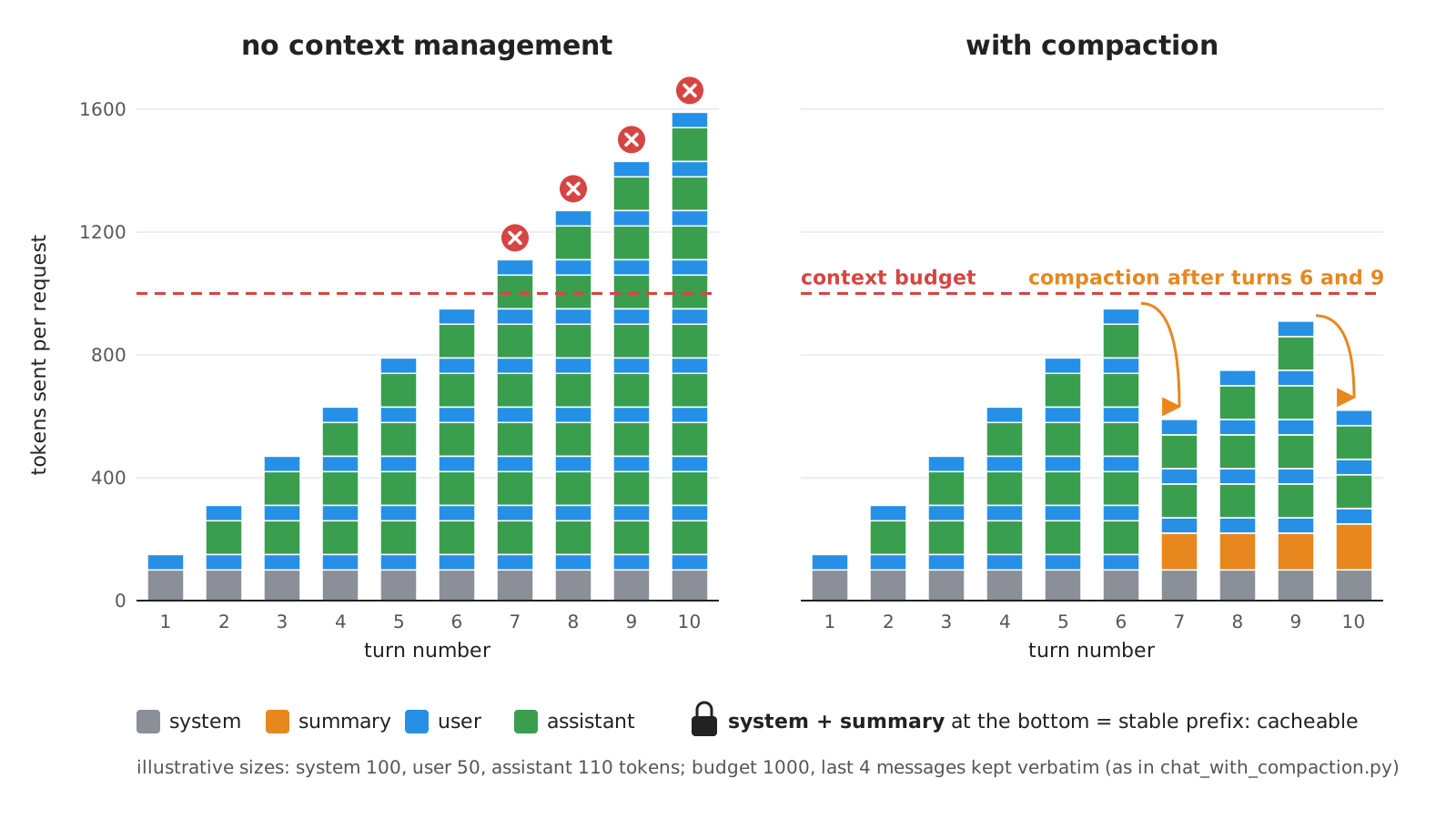
Prompt caching: the general concept
-
Prompt caching: the provider stores the internal state of the model (the KV cache) for a prefix of the prompt, and reuses it when a later request starts with exactly the same prefix
- cached input tokens are billed at a fraction of the price (OpenAI: discount depends on the model, up to 90%; Anthropic: reads at 0.1×, but cache writes cost 1.25× with 5-minute TTL, 2× with 1-hour TTL), and processed faster
- only the prefix is cached: any change invalidates the cache from that point on
- caches expire after some minutes of inactivity
-
Consequences for prompt design:
- put the stable parts first (system instructions, examples, documents), and the variable parts last (user input)
- avoid timestamps or random IDs at the beginning of prompts
- compaction and trimming change the prefix: there’s a trade-off between shorter contexts and cache hits
-
Not to be confused with the client-side caching of Exercise 1 of the LLM-as-a-Service lecture:
| Client-side response caching | Provider-side prompt caching | |
|---|---|---|
| What is cached | the whole response, for an identical request | the model’s state for a prefix of the prompt |
| Is the model called? | no | yes, the response is always generated anew |
| Saves | 100% of cost and latency | part of input cost, and time-to-first-token |
| Changes the output? | yes: same output every time (no sampling variability) | no |
Context management: the technological landscape
| Provider | Token counting | Prompt caching | Server-side compaction | Docs |
|---|---|---|---|---|
| OpenAI | POST /v1/responses/input_tokens (client.responses.input_tokens.count(...)), or offline via tiktoken (text only), cf. guide |
automatic for long prompts; optional prompt_cache_key |
context_management in the Responses API, or /responses/compact |
caching, compaction |
| Anthropic | /v1/messages/count_tokens endpoint |
cache_control: automatic (top-level) or explicit breakpoints; cache writes cost extra |
beta: on demand, or at a token threshold; plus context editing | caching, compaction |
| Google Gemini | count_tokens method |
implicit (automatic), or explicit caches created in advance | — | caching, tokens |
| OpenRouter | reported in usage |
forwarded to the underlying provider | — | caching |
| LangChain | count_tokens_approximately(...), llm.get_num_tokens_from_messages(...) (model-specific) |
reported in usage_metadata["input_token_details"]["cache_read"] |
trim_messages(...), summarisation middleware for agents |
short-term memory |
- Same concepts everywhere; different syntax, thresholds (e.g. minimum cacheable length), prices, and retention times
- Server-side compaction is convenient, but opaque (e.g. OpenAI’s compacted items are encrypted) and provider-specific: client-side compaction is portable
Example 4: CLI Chat with Context Compaction (pt. 1)
Goal: a CLI chat (as in Example 1 of the LLM-as-a-Service lecture) which keeps the context within a given token budget, by summarising older messages (best effort: the last
keep_lastmessages are never dropped)
-
Let’s configure the chat model, the budget, and how many recent messages to keep verbatim:
base_url = os.environ.get("OPENAI_BASE_URL", "https://openrouter.ai/api/v1/") api_key = os.environ.get("OPENAI_API_KEY") or input(f"Enter your API key for {base_url}: ") model = os.environ.get("OPENAI_MODEL", "nvidia/nemotron-3-super-120b-a12b:free") budget = int(os.environ.get("CONTEXT_BUDGET", "1000")) # tokens; tiny on purpose, to see compaction happen keep_last = 4 # most recent messages, always kept verbatim llm = ChatOpenAI(base_url=base_url, api_key=api_key, model=model) instructions = os.environ.get("SYSTEM_PROMPT", "You are a helpful assistant. Be concise.") summary = "" # summary of the older part of the conversation (initially empty) history: list[BaseMessage] = []- the state of the conversation is a (running)
summary, plus the recenthistoryBaseMessage: LangChain’s common superclass ofSystemMessage,HumanMessage, andAIMessage
- the budget comes from the
CONTEXT_BUDGETenvironment variable (in tokens), the instructions fromSYSTEM_PROMPT(optional)
- the state of the conversation is a (running)
-
The context sent at each request is: system instructions + summary (if any) + recent history:
def prefix() -> list[BaseMessage]: # the fixed instructions first (a stable prefix, hence cacheable), then the summary (if any) return [SystemMessage(instructions)] + ([SystemMessage(f"Summary of the earlier conversation:\n{summary}")] if summary else []) def context() -> list[BaseMessage]: return [*prefix(), *history] # what is actually sent to the LLM- the summary goes in a separate message, after the fixed instructions: the instructions stay a stable prefix, which the provider can cache
Example 4: CLI Chat with Context Compaction (pt. 2)
-
Compaction is itself an LLM call, asking to summarise the older messages (and the previous summary):
def compact() -> None: global summary, history older, history = history[:-keep_last], history[-keep_last:] # the LLM itself summarises the older messages (and the previous summary, if any) request = [*prefix(), *older, HumanMessage("Summarise the conversation so far in a few sentences. " "Keep all facts, names, numbers, and decisions.")] summary = llm.invoke(request).content -
The main loop compacts the context whenever its (approximate) size exceeds the budget, before sending it, and prints token usage at each turn:
while True: try: history.append(HumanMessage(input("You: "))) except (EOFError, KeyboardInterrupt): break if count_tokens_approximately(context()) > budget and len(history) > keep_last: # over budget: compact, then send compact() print(f" [context compacted: now ~{count_tokens_approximately(context())} tokens]") response = llm.invoke(context()) history.append(response) print(f"AI: {response.content}") usage = response.usage_metadata cached = usage.get("input_token_details", {}).get("cache_read", 0) # prompt caching: a stable prefix is cheaper print(f" [input: {usage['input_tokens']} tokens, of which {cached} cached | output: {usage['output_tokens']} tokens]")count_tokens_approximatelyis provider-agnostic (it assumes $\approx$ 4 characters per token): good enough for budgeting, not for billingusage_metadatareports the actual counts, including cached input tokens (if the provider supports caching)
Example 4: CLI Chat with Context Compaction (pt. 3)
-
Let’s try it (full code here):
poetry run python -m snippets -l prompting -e 4 -
Things to observe:
- tell the model your name, chat for a while, then ask for your name again: is it remembered after compaction?
- how do input tokens evolve over turns, before and after compaction?
- with a long system prompt (e.g. > 1024 tokens, via
SYSTEM_PROMPT) and a provider supporting caching, how many input tokens are cached? What happens to them right after a compaction?
-
Possible improvements (left to the reader):
- compact in the background, while the user is typing
- trim instead of summarising, via LangChain’s
trim_messages, and compare the two strategies
Example 4: Project Structure
Files of this example, in the lab-snippets repository (cf. how to set it up, and run snippets):
lab-snippets/
├── snippets/
│   └── lecture_prompting/
│       └── example4/
│           └── chat_with_compaction.py  # the CLI chat
└── pyproject.toml # dependencies of all snippets- set the environment variables
OPENAI_API_KEY(and, optionally,OPENAI_BASE_URL,OPENAI_MODEL,CONTEXT_BUDGET), cf. Free Access to LLMs
Exercise 2: Extract Structured Information from Pictures (pt. 1)
Goal: let’s say the committee wants to extract structured information from the ID documents of the candidates, which are provided as pictures in the application form, and wants to be confident about the extracted values
Code: put your solution in
snippets/lecture_prompting/exercise2/oflab-snippets, and run it viapoetry run python -m snippets -l prompting -x 2
TO-DO List
- let’s use some LLM with vision capabilities (e.g. OR model
google/gemma-4-26b-a4b-it:free) - let’s design a system prompt (context, general instructions) and a user prompt (specific instructions + the picture) to ask the model to extract structured information from the ID document, such as name, date of birth, ID number, expiration date, etc.
- let’s define a Pydantic class to represent the extracted information, with appropriate fields and documentation strings
- let’s call the LLM with the picture of the ID document as input, and get the structured information as output
- let’s query the model several times for the same picture, and keep, field by field, the most voted value (cf. self-consistency)
- fields with no clear majority should be flagged for human review
- let’s test the program with different ID documents, and see how well the model can extract the information
Exercise 2: Extract Structured Information from Pictures (pt. 2)
How to pass images to the model?
-
Many ways, documented here, simplest one is passing a base64-encoded image in the
contentof a message- the
contentis now a list of typed pieces (text, image, …) - LangChain converts them into each provider’s format (for OpenAI:
{"type": "image_url", "image_url": {"url": "data:..."}})
- the
-
[HOW-TO] Constructing a message with both text and image content:
import base64 from langchain_core.messages import HumanMessage def message_with_image(text, image_path, mime_type="image/png"): with open(image_path, "rb") as image_file: data = base64.b64encode(image_file.read()).decode("utf-8") return HumanMessage(content=[ {"type": "text", "text": text}, {"type": "image", "base64": data, "mime_type": mime_type}, ]) -
[HOW-TO] Define the Pydantic class to represent the expected structured information extracted from the ID document:
from pydantic import BaseModel, Field
from datetime import date

class IDDocumentInfo(BaseModel):
    """Structured information extracted from an ID document."""

    name: str = Field(..., description="The full name of the person in the ID document")
    date_of_birth: date = Field(..., description="The date of birth of the person in the ID document")
    id_number: str = Field(..., description="The ID number of the document")
    expiration_date: date = Field(..., description="The expiration date of the document")
Exercise 2: Extract Structured Information from Pictures (pt. 3)
-
[HOW-TO] Call the LLM with the message containing the image, and get an instance of the
IDDocumentInfoclass:from langchain_core.messages import SystemMessage from langchain_openai import ChatOpenAI llm = ChatOpenAI(..., model="google/gemma-4-26b-a4b-it:free") extractor = llm.with_structured_output(IDDocumentInfo) messages = [ SystemMessage("You are an assistant that extracts structured information from ID documents."), message_with_image("Please extract the information from this ID document.", "data/passport-mario-rossi.png"), ] results = extractor.batch([messages] * 5) # 5 samples, for voting -
[HINT] for field-by-field voting,
collections.Counter(getattr(r, field) for r in results).most_common(1)is your friend
Exercise 2: Extract Structured Information from Pictures (pt. 4)
| Image input requirements (OpenAI, at the time of writing) | |
|---|---|
| Supported file types | PNG (.png), JPEG (.jpeg, .jpg), WEBP (.webp), non-animated GIF (.gif) |
| Size limits | up to 512 MB total payload per request; up to 1500 image inputs per request |
| Other requirements | no watermarks or logos; no NSFW content; clear enough for a human to understand |
Solution: a walkthrough follows in the next (vertical) column — try on your own first!
Exercise 2: Extract Structured Information from Pictures — Solution
⚠️ Spoiler alert: the walkthrough of the solution of Exercise 2 is about to start
- Do not proceed until you have attempted the exercise on your own
- press → to skip the walkthrough, ↓ to see it
- The solution’s code is on the
masterbranch oflab-snippets- you are supposed to work on the
exercisesbranch, which only contains placeholders
- you are supposed to work on the
Exercise 2 — Solution: the vision model
Step 1: a model with vision capabilities, configured separately from the default one
base_url = os.environ.get("OPENAI_BASE_URL", "https://openrouter.ai/api/v1/")
api_key = os.environ.get("OPENAI_API_KEY") or input(f"Enter your API key for {base_url}: ")
# step 1: a model with vision capabilities (a separate env var, as other snippets may need a model with other capabilities)
vision_model = os.environ.get("VISION_MODEL", "google/gemma-4-26b-a4b-it:free")

vision_llm = ChatOpenAI(base_url=base_url, api_key=api_key, model=vision_model, temperature=1.0)  # some randomness, for voting
- A dedicated environment variable (
VISION_MODEL):OPENAI_MODELmay point to a text-only model, used by other snippets- text-only models either reject image inputs, or (worse) silently ignore them and hallucinate
temperature=1.0: samples must differ a bit, otherwise voting is pointless (cf. self-consistency)
Exercise 2 — Solution: output schema and system prompt
Steps 2–3: a Pydantic class with documented fields, and a system prompt giving the context
# step 3: the output schema (dates as `date`, so that pydantic validates them, and code can compare them)
class IDDocumentInfo(BaseModel):
    """Structured information extracted from an ID document."""

    name: str = Field(description="The full name of the holder, as written in the document: given names first, surname last.")
    nationality: str = Field(description="The nationality of the holder, as written in the document.")
    date_of_birth: date = Field(description="The date of birth of the holder.")
    id_number: str = Field(description="The number of the document, as written in its visual zone (not in the machine-readable zone).")
    expiration_date: date = Field(description="The date of expiry of the document.")


# step 2: system prompt (context, general instructions) + user prompt (specific instructions + the picture)
SYSTEM_PROMPT = """You are an assistant of the admission committee of a PhD programme.
You extract structured information from the pictures of the candidates' ID documents.
Report values exactly as written in the document; documents may be multilingual: prefer the Latin-alphabet version of each value."""
- Dates are typed as
date: Pydantic validates them, and code can compare them (e.g. is the passport expired?) - Descriptions remove ambiguities which would split votes: name order, visual zone vs. machine-readable zone, multilingual values
nationalityadded w.r.t. the hint: the schema is yours to design
Exercise 2 — Solution: passing the picture
Step 2 (cont.): the user message is a list of typed pieces: the instruction (text) + the picture (base64)
def message_with_image(text: str, image_path: Path) -> HumanMessage:
    """A user message made of a text and a picture (base64-encoded), cf. the slides."""
    mime_type = mimetypes.guess_type(image_path)[0] or "image/png"  # e.g. "image/png" for .png files
    data = base64.b64encode(Path(image_path).read_bytes()).decode("utf-8")
    return HumanMessage(content=[
        {"type": "text", "text": text},
        {"type": "image", "base64": data, "mime_type": mime_type},
    ])

extractor = vision_llm.with_structured_output(IDDocumentInfo)
mimetypes.guess_typeinfers the MIME type from the file extension, so that.jpgpictures work too- LangChain translates the
imagepiece into the provider’s format (e.g. OpenAI’simage_urlwith adata:URL) with_structured_outputworks with multimodal inputs exactly as with textual ones
Exercise 2 — Solution: sampling
Step 4: query the model several times, in parallel, on the same picture
def sample(image_path: Path, samples: int = 5) -> list[IDDocumentInfo]:
    """Step 4: queries the model `samples` times (in parallel) about the same picture."""
    messages = [SystemMessage(SYSTEM_PROMPT), message_with_image("Please extract the information from this ID document.", image_path)]
    results = extractor.batch([messages] * samples, return_exceptions=True)  # a failed sample (e.g. invalid JSON) is not fatal...
    valid = [r for r in results if isinstance(r, IDDocumentInfo)]
    if not valid:  # ... unless all of them fail
        raise RuntimeError(f"All {samples} samples failed, e.g.: {results[0]}")
    return valid
.batch(...)sends the requests concurrently: $N$ samples cost $N\times$ tokens, but (roughly) not $N\times$ timereturn_exceptions=True: one invalid sample (e.g. malformed JSON, a date that is not a date) should not kill the whole run- small, free models fail often: failing only when all samples fail is a pragmatic trade-off
Exercise 2 — Solution: voting, and flagging
Step 5: field by field, keep the most voted value, and flag fields with no clear majority for human review
def vote(results: list[IDDocumentInfo]) -> tuple[IDDocumentInfo, dict[str, float]]:
    """Step 5: for each field, the most voted value, and its agreement rate (fraction of results with that value)."""
    voted, agreement = {}, {}
    for field in IDDocumentInfo.model_fields:
        value, count = Counter(getattr(r, field) for r in results).most_common(1)[0]
        voted[field], agreement[field] = value, count / len(results)
    return IDDocumentInfo(**voted), agreement


def flagged(agreement: dict[str, float]) -> list[str]:
    """Fields with no clear (i.e. absolute) majority: a human should check them."""
    return [field for field, rate in agreement.items() if rate <= 0.5]


def extract(image_path: Path, samples: int = 5) -> tuple[IDDocumentInfo, list[str]]:
    """The whole pipeline: sample, vote, flag. Returns the voted information, and the fields to be reviewed by a human."""
    info, agreement = vote(sample(image_path, samples))
    return info, flagged(agreement)
IDDocumentInfo.model_fields: the fields of a Pydantic class (adictkeyed by field name);IDDocumentInfo(**voted)rebuilds (and validates) an object out of the voted values- Voting per field (rather than on whole objects) tolerates samples which are wrong on one field only
- The agreement rate is a cheap confidence measure: at most 50% means no absolute majority $\Rightarrow$ ask a human
- the threshold is a policy decision: stricter for fields that matter more (e.g.
id_number)
- the threshold is a policy decision: stricter for fields that matter more (e.g.
Exercise 2 — Solution: Project Structure
Files of this solution, in the lab-snippets repository (branch master):
lab-snippets/
├── data/
│   ├── passport-jean-dupont.png   # inputs (running example)
│   ├── passport-mario-rossi.png
│   ├── passport-mohammed-ali.png
│   └── __init__.py                # helpers to locate data files
├── snippets/
│   └── lecture_prompting/
│       └── exercise2/
│           └── id_extraction.py   # sample, vote, flag
└── pyproject.toml                 # dependencies of all snippets
poetry run python -m snippets -l prompting -x 2 mario-rossi 5 # candidate's ID (or picture path), number of samples
- set the environment variables
OPENAI_API_KEY(and, optionally,OPENAI_BASE_URL,VISION_MODEL), cf. Free Access to LLMs - Step 6: try all three passports (e.g. Mohammed Ali’s is multilingual): which fields get flagged? Does it change with more samples?
Check your understanding
-
Answer in your own words, motivating your conclusions and using examples where useful.
-
Questions asking whether something is possible or desirable require more than a yes/no answer.
-
Implementation questions can be answered with an explanation or pseudocode unless executable code is explicitly requested.
-
Labels identify the primary learning target:
- notions (knowledge), reasoning (drawing conclusions), or know-how (applying knowledge).
- theoretical questions are independent of particular technologies; practical questions concern their use.
-
Practical answers should identify the technology used, without requiring memorisation of product-specific details (model names, prices, API signatures, versions, limits).
Check your understanding (1/6)
Designing prompts
-
[know-how, theoretical] How would you turn a vague request into a reusable prompt? Discuss how you would distinguish instructions, context, input data, and the expected output.
-
[reasoning, theoretical] Should prompts be managed like source code? Explain what should happen when a prompt or its underlying model changes, and why a successful example is insufficient evidence that a prompt works well.
-
[know-how, theoretical] When would you use few-shot rather than zero-shot prompting? How would you choose examples, and how could poorly chosen examples make the results worse?
Check your understanding (2/6)
Designing prompts
-
[reasoning, theoretical] What can asking a model to produce intermediate reasoning steps change about its answer? Discuss the limits of treating a generated explanation as evidence of correct reasoning.
-
[reasoning, theoretical] What is self-consistency, and when might it help? Can agreement among repeated answers be interpreted as the probability that the answer is correct?
-
[know-how, theoretical] When would you split a task into a chain of prompts rather than use one prompt? Explain how you would choose the intermediate results and deal with errors passed from one step to the next.
Check your understanding (3/6)
Structured outputs
-
[reasoning, theoretical] What is the difference between asking for JSON, obtaining valid JSON, and obtaining an object that conforms to a schema? What does each guarantee about the usefulness and correctness of the result?
-
[know-how, practical] How would you use Pydantic to define structured information to extract from a document? Explain how field types, constraints, nesting, and descriptions contribute to the schema sent to the model.
-
[reasoning, theoretical] How should an extraction schema represent missing, unknown, or unreadable information? Discuss the difference between a required field, a nullable value, and a default value.
-
[notions, theoretical] How can structured output be enforced during generation? Compare constrained decoding, parsing and validation after generation, and using tool-call arguments as the output.
Check your understanding (4/6)
Structured outputs
-
[know-how, practical] How would you request and consume structured output through an LLM client library? What should your application do if the model does not support the requested schema, refuses the request, or returns an unusable result?
-
[reasoning, practical] What does LangChain add to using a provider’s client directly? Explain how prompt templates, chat models, and structured outputs can be composed, and what portability this does and does not provide.
-
[know-how, theoretical] How would you turn a natural-language scoring policy into an LLM-filled checklist and a deterministic scoring function? Which sources of variability or error would this remove, and which would remain?
Check your understanding (5/6)
Reasoning and context
-
[notions, theoretical] What distinguishes a reasoning model from a model prompted to “think step by step”? Explain the role of reasoning tokens and the trade-off between computation at inference time, cost, latency, and answer quality.
-
[know-how, practical] How would you choose and adjust a reasoning budget for an application? What would you measure to decide whether spending more on reasoning is worthwhile?
-
[reasoning, theoretical] Is it always beneficial to give an LLM as much context as its window allows? Discuss relevance, position, cost, and the space needed to generate an answer.
-
[know-how, practical] How would you keep a long-running chat within a token budget? Compare trimming with summarisation, and explain what you would do if the context still exceeded the budget after compaction.
-
[reasoning, theoretical] How does provider-side prompt caching differ from caching complete responses in the client? Explain how prompt layout and context compaction affect the opportunity to reuse cached computation.
Check your understanding (6/6)
Extracting information from images
-
[know-how, practical] How would you extract typed information from an image of a document? Explain how you would supply the image and instructions, and check that the chosen model and API can process them.
-
[reasoning, theoretical] Several extractions of the same document disagree. What are the benefits and risks of voting separately on each field? How would you handle failed samples, ties, and a result whose fields are individually plausible but inconsistent together?
Lecture is Over
Compiled on: 2026-10-22 — printable version